RECALL DELINQUENCY REPORT
OVERVIEW: The Recall Delinquency Report program allows you
to print a report for patients whom were scheduled
for a recall or have failed to show up for their recalls.
Additionally you can simply print a list of all the patients in
the recall system to review the status of the recalls.
PROCEDURE: From the Patient Recall Menu select Option 4 and
press <Enter>. The screen below will be displayed.
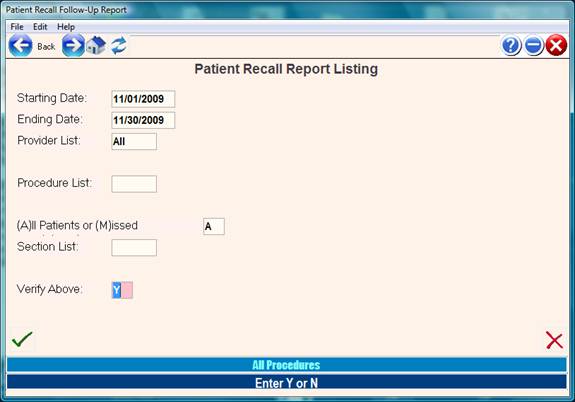
1. Starting and Ending Dates:
Enter the date range for dates when the patient was supposed to have
been recalled.
Example: If the patient was recall was entered on September 15, and
the recall was for 6 months, March 15 of the next year would be the
recall date. To find people who were supposed to be recall in March,
enter March 1 through March 31.
3. Provider List:
For all providers, just press <enter>. You may enter 1 or more specific
providers codes here. Example provider codes are 001, 020, 203.
Provider codes are 3 digit numbers in the recall program.
4. Procedure List:
These are the specific codes used for the recall. You may select 1
or more of these codes or press <enter> for all codes.
Example recall codes are EXAM, FLUP, RECHK, MEDS.
Recall codes are 1-5 digits and are often linked to an actual billing
code so that the recall process can be tracked accurately.
Recall cods other than billing codes must be entered in the charge code
tables without a site code (Global table).
5. All Patients or Missed Appointments: If you answer ‘M’ for missed
appointments, patients who were seen on their recall date will be
omitted from the report.
6. Section List:
If you have a Electronic Medical Records installed, this prompt will
appear. Enter a list of medical record form codes which would best
portray that the recall was satisfied. The date of completion will
list on the report for each form sections specified.
Example: When recalling for Influenza Virus vaccine, it may be best
to look at the date of the last flu shot.
When looking at an asthma recall, you may want to know the last date
of the asthma evaluation form.
Examples of form codes are EXAM, HPI, PF1, PMR, MEDS, PEIT, CAT.
After you have satisfied the above prompts, the system will open
a window in the middle of your screen allowing you to select an
destination (Printer) device.
Select the appropriate destination device and press <Enter> or Click OK.
The system will print the Patient Recall Report for the
period you have specified. Example:
03:28:34 PM PATIENT RECALL REPORT FOR PERIOD: * ALLPATIENTS* 01/01/1999 - 06/30/1999
Recall Recall Recall Patient Referal
Date Time Patient Name Proc Dr # Seen Telephone Dr.Name Account #
03/09/99 : TEST, PATIENT EVAL 001 No 810-555-1212 SMITH 000070
EXAM: 01/06/1999 PEIT: 00/00/0000 ASM : 00/00/0000
03/09/99 : BRITTES, WALTER asthm 001 No 908-369-4798 CHENG, 213100
EXAM: 09/17/1998 PEIT: 00/00/0000 ASM : 00/00/0000
03/09/99 : LULU, STANLEY EVAL 001 No 908-281-6124 DIZIKI, 223480
EXAM: 09/08/1998 PEIT: 00/00/0000 ASM : 00/00/0000
03/09/99 : JONES, DYLAN ASTHM 001 No 732-356-2009 LAPKIN, 225370
EXAM: 09/08/1998 PEIT: 09/08/1998 ASM : 09/08/1998
Column definitions:
Recall Date: This is the date the patient was supposed to be recalled.
Recall Time: This is the optional time that can be entered with a recall.
Patient Name: Patient name
Recall Proc: This is the recall code entered at the time the recall was made.
Dr # : This is the 3 digit provider code entered at the time of the recall.
Seen: : If the patient was seen after the recall date for any purpose, this
column will say Yes.
If the patient was not seen after the recall date the column
will say No.
Referral : This is the current referring source from the patient demographic
screen.
Account # : This is the patient full account number.
Entering Patient Recalls through Charge Entry
After completing a charge entry session, office medicine contains an optional
Prompts to setup a recall immediately following the verify of the charges.
The following prompt will appear:
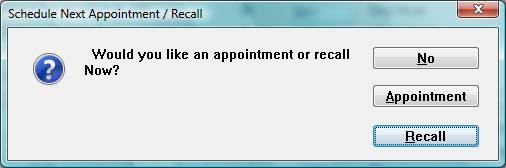
Press the letter R or click on the Recall button,
If the patient is to be set up with a recall date.
He recall popup window will appear:
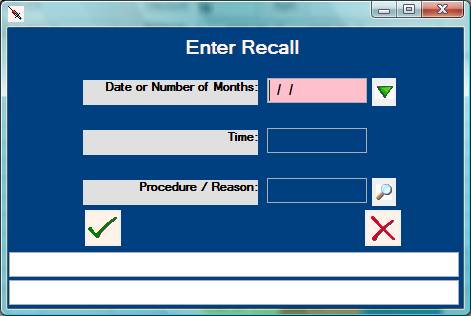
Type in the date to be recalled. If the patient is to return
in several weeks or months with no definite date, enter the
number of months. If a date is given, use the six-digit format.
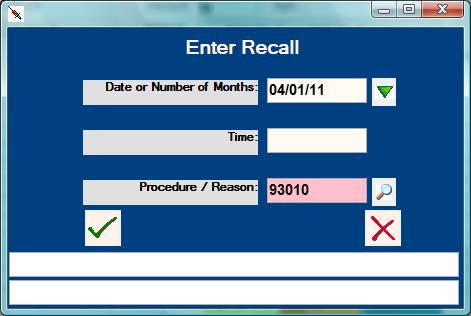
If this patient has an appointment time set up, and you are
using the recall to remind the patient of his/her appointment,
you can fill in the hour and minute of the scheduled appointment.
Note: The schedule system also has a reminder function.
Normally press <ENTER> without filling in the time.
You must fill in the procedure code at the Procedure/Reason prompt to
allow the system to set up the recall. Procedures for the recall
must be entered in the Global Procedure Table.