Menu Utility Program (ACDMENU)
Purpose: To allow changes to existing menu selections and descriptions; for adding or deleting items from a menu; or to create a completely new menu.
Background: The menu system is comprised of database records which are stored in a file. Each menu represents one record which contains up to 36 program codes and a corresponding description for each program.
Procedure: Type the code ACDMENU from the main menu address bar.
If you do not have Table Setup Permission granted for your user code, you will not be able to use this utility. A selection for the Menu Utility may also be located in the Tables Menu.
Fields:
Enter Code: Enter the code for the dictionary here. The code for a given dictionary can be found in the menu title bar in parenthesis. The menu code generally have the word MENU somewhere in the code.
Example: The Medical Records Menu code is PMRMENU.
- Title: This is the title that displays on the title bar for a given menu.
Items # 2-33. ( Columns 1 & 3 ) These are the program codes.
Items #34-65 ( Columns 2 & 4 ) These are the associated descriptions.
Type in the menu code 'PMRMENU'
The following screen will display:
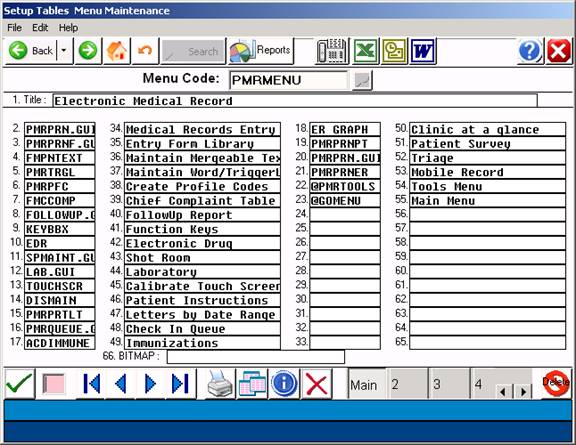
In order to make changes, enter the field number from the Command Line, type the desired changes, then click the SAVE ( Green Arrow ).