MCIR – Immunization Interface Module
Overview: The MCIR Dictionary program allows a translation of the immunization data stored in the Office Medicine ™ Electronic Medical Record.
Data elements required for the MCIR database are supplied by the MCIR dictionary.
These include specific manufacturer codes, and site information based on the States MCIR specifications.
A second program called the Immunization Export, is run monthly and actually creates the export file which is then sent to the State by use of the MCIR website.
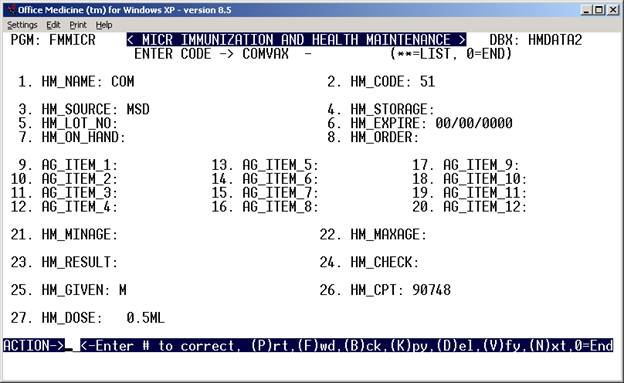
Example Screen for the MCIR dictionary
Manufacturer Codes
Required Fields are as follows
( HM – Short for Health Maintenance )
- HM_NAME - Name of the Vaccine,
- HM_CODE – Code for the vaccine given by the State.
- HM_SOURCE – Manufacturer code given by the State
25. HM_GIVEN – Site code given by the state
26. HM_CPT – Billing code
27. HM_DOSE – The dosage given
Procedure:
1. Create a list of all the vaccines given, the manufacturers, lot numbers, site and dosage.
- Create a form in the Electronic Medical Record for the immunizations.
The form code must be HMNT
Refer to the Medical Records Forms documentation in order to create this form.
Example HMNT Form
HEALTH MAINTENANCE:
CONTRAINDICATIONS TO IMMUNIZATIONS - NONE
PRIOR REACTIONS TO IMMUNIZATIONS - NONE
PARENT EDUCATION LITERATURE GIVEN FOR THE FOLLOWING -
DTP OPV HIB HBV MMR
BENEFITS, RISKS, AND QUESTIONS ADDRESSED FOR THE FOLLOWING -
DTP OPV HIB HBV MMR
VACCINE DATE INIT SITE ROUTE MANUFACT LOT # EXP DATE
DTP/HIB.. ______
DTP/HIB.. ______
DTP/HIB.. ______
DTP 1.... ______
DTP 2.... ______
DTP 3.... ______
DTP 4.... ______
DTP 5.... ______
Td....... ______
OPV 1.... ______
OPV 2.... ______
OPV 3.... ______
OPV 4.... ______
HIB 1.... ______
HIB 2.... ______
HIB 3.... ______
HIB 4.... ______
HBV 1.... ______
HBV 2.... ______
HBV 3.... ______
MMR 1.... ______
MMR 2.... ______
INF...... ______
LADT ________________________________________________________
TEST DATE INIT RESULT
HGB...... ______
CHOL..... ______
UA....... ______
COMMENT: ________________________________________________________
Example Form as seen from the Electronic Medical Record (EMR)
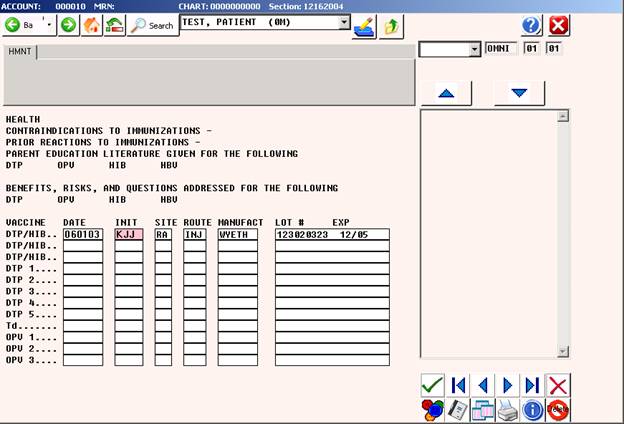
- Enter the codes used for immunizations into the MCIR dictionary with the required fields are listed above.
- Enter each Patient’s immunization record in the EMR by using the HMNT form
- Run the Immunization Export program monthly in order to transmit the immunization data to the State.
Immunization Export Screen:
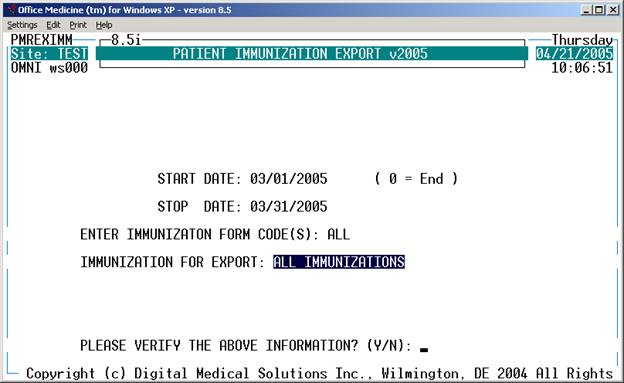
The export program will then create the MCIR file which will contain all the immunizations given within the time period specified.
The export program will then bring up the MCIR.org website
- Login to the website with your login/password assigned by the State.
- Select Import
- File to Import is C:\om8\wp\MCIR.txt
- Results of the import will then be displayed.
Please note – example of the dictionary, HMNT screens are already contained within the Office Medicine ™ system.
You may need to only modify the dictionary and screens in order to conform to your individual practice.