THE OFFICE MEDICINE (tm)
by DIGITAL MEDICAL SOLUTIONS INC.
(DMSI)
IMPLEMENTATION GUIDE
Section One Outline
of responsibilities and expectations summary
-
Sales Representative
-
Implementation Liaison
-
Hardware Preferred Business Partner
-
Telecommunications Preferred Business Partner
-
Forms/Supplies Preferred Business Partner
-
Office Medicine (tm) Conversion Department
-
Office Medicine (tm) Trainer
-
What Office Medicine (tm) expects from the CLIENT
Section Two Implementation
Roadmap
-
Diagram of the process
-
Implementation Survey
Section Three Data
Preparation and Fact Finding
-
Fact Finding Questionnaire
-
Data Entry Worksheets
-
What to expect from a data conversion
-
Data Conversion Acceptance Criteria Document
Section Four Office
Medicine Training
-
Microsoft Windows and Microsoft Word Knowledge and Experience
-
Pre-Training Check Sheet
-
Training Options
-
DMSI Core Training Outline
-
Training Survey
Section Five DMSI
Add-on Module Training
-
Info-to-go (Motion Tablet)
-
Info-Unplugged (I-Phone)
-
Card-Scan or Scan Shell
-
Script Writer II
Section Six Electronic
Data Interchange (Claims and/or Statements)
-
Implementation Overview
-
Training Overview
-
Registration Forms
Section Seven Hardware,
Software Installation and Cabling
-
Working with the OM business partners
-
Who will contact the client?
-
What is the process to communicate with the client?
-
Foreign hardware integration
-
Expectations of OM business partner and local vendor
-
Installation of DMSI software on to foreign equipment
-
Cabling and Network Specifications
-
Remote support requirements
-
Telecommunications requirements
-
Inventory list of all equipment that will be used with DMSI
-
Backing Up Your Data
Section Eight
Contacting Office Medicine (tm)
-
Accounting Questions
-
Software Support Questions
-
Hardware Maintenance Questions
-
Office Medicine (tm) Contact List and Escalation Process
Section One
Outline of Responsibilities and Expectations
Summary
Sales Representative
The Sales
Representative is your initial contact with Office Medicine (tm), Inc. He(She)
is responsible for doing the initial fact-finding regarding your expectations,
and distributing this knowledge to the other groups who will play a part in
your new system implementation. The other groups who will work with you are
our Preferred Business Partners for hardware, telecommunications and
forms/supplies, the Office Medicine (tm) Implementation Liaison and the Office
Medicine (tm) Training Department. Your Sales Representative will use a
document we call the “20 Questions” as a guide. This questionnaire is designed
to give us a list of questions that we need to learn the answers to in order to
provide you with the smoothest implementation possible. However, if we don’t
ask a question that you think needs to be discussed please bring it up as early
as possible in the process.
Implementation Liaison
The
Implementation Liaison will be your primary contact with Office Medicine (tm),
Inc. He(She) will work closely with your Sales Representative and the Sales
Administrator to ensure that the 20 Questions document is complete and
accurate. He will communicate with the Preferred Business Partners to ensure
that each piece of your implementation is occurring on schedule, and adjust the
schedule as needed. We use Microsoft Project® and Microsoft Access® to manage
your implementation.
Within 48
hours of a signed contract you should receive a call from your Implementation
Liaison, if you do not please call your Sales Representative so that we can
make sure this important contact gets in touch with you.
It is important
to understand that we funnel all information regarding your new system
implementation through the Implementation Liaison. Any questions you have
should also be funneled through this all-important contact.
Hardware Preferred Business Partner
Office Medicine (tm) has made the
decision to contract with external vendors who specialize in areas that we are
not experts in. However, we work closely with our Preferred Business Partners
to ensure that they provide you with the quality service we expect. This
allows you to work with an expert, but also receive the benefits of a
“one-stop-shop”. It is important to us to that they are providing you with the
best service, and you will be receiving a survey from us regarding their work.
Our Preferred Business Partners
are:
gerald@reliableit.net
Gerry Sornig - Reliable IT (586) 246-3380
·
gerald@reliableit.net
·
Reliable I.T. Solutions, Inc.
·
43120 Lira Sterling Heights, MI 48313
·
http://www.reliableit.net
- Corporate Site
·
586.246.3380 - Phone Number
- 586.932.6010 - Fax Number
----------
David McGlaghlin davidm@dataproservice.com
----------
Russ Giopelli (313) 690-6923 rgiacopelli@sbcglobal.net
http://www.isourceworldwide.com/contact_us.php
Telecommunications - Global
Crossings #
Forms/Supplies - Wallace Business
Forms #
When calling these business
partners, please let them know that you are a Office Medicine (tm) client.
Telecommunications Preferred Business Partner
When using the
Application Service Provider (ASP) solution, a high-speed internet telephone
line must be installed for connection to the ASP server. There are several
options for high-speed phone lines: DSL, Fractional T-1 and Frame Relay being
the most common. DSL is the less expensive choice, but depending on your
office location DSL may or may not be available from your local telephone
company.
Comcast, FIOS
or Real Time Systems (RTS) and Local Vendor Services Group (SSG), our Hardware
Orders Fulfillment Business Partners (hereafter called our HOF BPs) will be
able to coordinate your telecommunications with Global Crossings for you.
Although Global Crossings is our preferred telecommunications business partner,
there are some areas of the United States where the local telephone company or
another vendor may provide greater “bandwidth” (i.e., the capability of the
phone line to transfer your data to and from the ASP server in a sufficiently
speedy manner). Therefore, we suggest that you allow your HOF BP to research
and set up this connection for you.
Essentially,
the HOF BP will ask questions of you regarding the number of workstations on
which you plan to run the Office Medicine (tm) By Digital Medical Solutions Inc.
(DMSI) product, and how much those workstations will be used during a day. For
example, your office may have three front desk and two billing office machines
that are worked on all day and three machines in physician offices that are
used infrequently during the day. HOF BP will then calculate from that
information the bandwidth needed to successfully run the DMSI product and
recommend the appropriate telecommunications solution.
Forms/Supplies Preferred Business Partner
Office
Medicine (tm) has negotiated very competitive rates on HCFA forms and supplies
you may need for your office. Even though you may be submitting your
insurance claims electronically, you will need HCFA 1500 forms in the office
for testing, printing of secondary forms or printing of claims that the
insurance carrier will not accept electronically unless you have elected tohave
the clearing house print and mail misc commercial insurances.
Office Medicine (tm) Conversion Department
The Office
Medicine (tm) Conversion Department has the ability to perform a demographic
only conversion from your existing practice management system in to DMSI. In a
“demographic only” conversion we can usually read the previous vendor’s file
well enough to convert patient name & address, insurance carrier & plan
name, insurance subscriber and the maintenance tables (insurance carrier/plan
list, CPT-4 code list, ICD-9 code list, facility list, physician list). Our
conversion department will provide you with a document called the acceptance
criteria that will detail out exactly what will and will not convert from
your previous system. A demographic conversion will NOT contain any financial
information. In Section Four of this booklet we will describe further the
acceptance criteria document and the conversion process.
Office Medicine (tm) Trainer
Training is
typically conducted at the client site, and takes three to four days depending
on the number of users to be trained. We require the undivided attention
of those being trained. The mission of a Office Medicine (tm) trainer is to
educate the client on the daily functions of the DMSI product so that he can
successfully submit insurance claims and patient statements and to educate him
on the monthly reporting abilities of DMSI which will allow the client to
successfully manage his practice. The trainer is instructed not to leave
training until both HCFA forms and patient statements are being created on
paper to the clients specifications.
The Training
Department has provided your sales representative with a grid outlining the
number of days of training required based on the number of users on the
system. However, each office is unique and we will be glad to customize a
training program for you that will allow you to get the most out of the system
from the beginning.
What Office Medicine (tm) Expects from the
Client
As mentioned
above, we have a document we call the 20 Questions. The title “20
Questions” is only a title, because it is more than just twenty questions, but
will hopefully address all the issues we need to be aware of as we manage your
implementation. However, if there is anything that you think we need to know
we ask that you relate that information to your Implementation Liaison.
Oftentimes something as simple as typical office hours, the location of a modem
phone jack or a remote office are assumed but not communicated.
We expect you
to read all documentation sent to you, and complete and return any forms as
quickly as possible. We will use a Microsoft Project template to manage your
implementation; many of the tasks are interrelated and unless each one is
completed on time then the entire project can be delayed.
Section Two
The Implementation Roadmap
Diagram of the Process
On the next
page you will see a roadmap that outlines each step in your new system
implementation. Once your sales representative has completed his initial
fact-finding and entered your purchase order in to our system your
Implementation Liaison will contact you and go through each step in this process.
Please let him know immediately if there is anything you are concerned about
regarding your system implementation.
By the time
your order is in our system for the software purchase, you should already have
your hardware lined up and scheduled for installation. Your sales
representative will help you work with our Preferred Business Partner, Real
Time Systems, on the telecommunications setup, hardware purchase and
installation. If you have chosen to implement the system using our
Application Service Provider (ASP), a high-speed internet connection is
required. Internet lines such as FIOS or T-1 must be contracted for and often
take six to eight weeks for installation. Please refer to section three on
specific telecommunications requirements.
Insert
page Sarasota\Main\DMSI\Client Implementations\Implementation Roadmap.ppt
Implementation
Survey
It is
important to us that we meet your expectations in a communicative and timely
manner. Therefore, we ask that you complete the following survey and return to
us within four weeks of your Go Live date.
Please be as
candid as possible and feel free to elaborate in the comments section of this
survey. Thank you for your business. We appreciate your confidence and will
do our best to continue to earn your trust in the future.
1. Did we provide adequate
information regarding hardware and
telecommunications
specifications? Yes No
2. Did we do a good job assisting
your communication with
our Preferred Business
Partners? Yes No
3. Was the system set up
according to your specifications? Yes No
4. Did we set your expectations
correctly regarding your
responsibilities in
preparation for the new system? Yes No
5. Please rate the clarity of our
data collection and
pre-installation instruction
materials. [ ]Excellent [ ]Good [ ]Fair
[ ]Poor
6. Based on your experience so
far with Office Medicine (tm),
what is your current
satisfaction level? 0 1 2 3 4 5
7. What can be done to improve your
satisfaction?
_____________________________________________________________________________________
_____________________________________________________________________________________
Section Three
Data Preparation and Fact Finding
Although the
next few pages will appear rather daunting, we ask for your patience. The more
questions we ask up front, the better service we can provide. Depending on
whether or not we will be providing a data conversion some of these sheets may
not need to be completed. Your Implementation Liaison and Conversion
Coordinator will go through this packet with you and let you know which sheets
you need to complete.
General Fact Finding
Please clearly title and send a
copy of the following information to your Implementation Liaison. These will
be given to your trainer so that they can adequately prepare for your training.
1. Copy of
current financial reports Done
_________
2. Example of a
patient statement Done
_________
3. Copy of a
completed standard HCFA Done _________
4. If you plan
to use the computerized appointment scheduler, copy
your
schedule of a normal work week for each provider. Done _________
Create a
template of a "perfect week" schedule; modifications
can be made later. Done
_________
5. Copy a charge
sheet/fee ticket/route slip/superbill
(hopefully
one of these terms fits your office terminology) Done: ________
Data Entry Worksheets
Based on conversations with your Implementation
Liaison and Conversion Coordinator, please complete the following worksheets
and return to Office Medicine (tm) no later than ______________________.
- Basic Clinic Data Information
- Location Code Maintenance
- Provider Information
- Facility Information
- Staff Information
- Insurance/Plan Information
- Dunning Messages
- Printer and Devices
Information
- Employer Maintenance
- Appointment Codes and
Descriptions
- Recall Codes and Descriptions
- Zip Code Maintenance
What To Expect From A Data
Conversion
Data Conversion Acceptance Criteria
Document
Section Four
Office Medicine (tm) By Digital Medical Solutions
Inc. Training
Microsoft Windows and Microsoft Word Knowledge
and Experience
Pre-Training Check Sheet
- Please have on hand the
following:
- Will you be adding Service Charges
(Late Fees) to your outstanding patient due balances? If yes, is it
based on ; %Percentage: �Yes �No Flat Fee: �Yes �No
- Complete the
form listing personnel and their responsibilities. Think about the areas
each staff member will be working with i.e. Scheduling, Payment and Charge
entry, Patient entry. Begin determining which users will need access to
this information for your security set ups within DMSI.
- Complete the
form containing the Dunning Messages. The Dunning message will be printed
based upon the age of the account (i.e. 30 days, 60 days, 90 days, 120
days). Default Dunning messages are set up at the Practice Preference
table. Billing Category set ups can be flagged to override the default
messages. You can inhibit the Dunning messages by not setting the
"Print Dunning Messages" at the patient entry level. You will
need to develop standard Dunning messages for the aging balances.
- A copy of
your standard fee schedule and all the Carrier/Plan fee schedules you have
available. This is critical information for your insurance carrier set
ups.
- A copy of
all capitated plan(s) fee schedules and any HMO or PPO plans. This is
critical information for your insurance carrier set ups.
- Pre-printed
HCFA forms for laser printer. There are specific vendors DMSI utilizes
for this purchase.
- Copies of
any collection letters, recall letters, reminder cards etc. that you
currently use.
- The security
grid supplied with this implementation packet along with your personnel
list. This will be used to establish user security levels.
Training
Options
Office
Medicine (tm) By Digital Medical Solutions Inc. core product training is
conducted in a one-trainer to one-office manner. Training may take place
either at the client site or at a Office Medicine (tm), Inc. Training Facility,
if available. We offer subsequent product training either on-site or in a
classroom setting. These additional trainings are modular, and your trainer
can provide you with a training schedule. The current fee for one day of
on-site training is $600.00 per day.
Office
Medicine (tm) By Digital Medical Solutions Inc. Core Product Training Outline
“Core product
training” is the initial training provided to an office. The goal of this
training is to introduce the client to as many features of the product as
possible, but to ensure that the client can successfully create insurance claim
forms and patient statements and understand the essential day to day functions
of the system. DMSI is a very robust practice management product and we simply
can not teach all features in the days we set aside for core product training.
Our experience shows that there is a saturation level and once we reach that
any additional training that we provide will simply not be absorbed. Therefore,
we cover the core product features initially and then suggest that certain
staff attend additional modular or advanced training on the features that are
pertinent to their job responsibilities.
On the
following page(s) is a document your trainer will ask you to complete as you go
through training. This checklist is our training outline. Although the
training is divided in to sections, we build upon information that is taught in
the first sections in subsequent sections. Therefore, it is imperative that
we have the undivided attention of all students for the entire core product
training.
Office Medicine (tm) By Digital Medical Solutions Inc. – Client
Training Checklist
Client Name:__________________________________________
Authorized
Signature:_____________________________
Training Date: _____ __, 2012__________________
Listed below
is an outline of what will be covered by a Office Medicine (tm)software trainer
during your OFFICE MEDICINE (TM)BY DIGITAL MEDICAL SOLUTIONS INC. training. We
ask that you initial each section as it is covered. At the end of training
your trainer will ask you to sign the “Training Sign-Off” sheet so that we may
keep it in your file. The purpose of this sign-off is to ensure that we agree
on the quality and content of training, which will enable you to take full
advantage of OFFICE MEDICINE (TM)BY DIGITAL MEDICAL SOLUTIONS INC..
q
Windows Login -
OM Login Initials ________
q
DMSI
Overview Initials ________
q
Title
Bar
q
Menu
Bar
q
Icons
Tables Initials ________
Patients
q
Billing
Categories
q
Referrals
Practice
q
Practice
Preferences
q
Offices
q
Departments
q
Providers
q
Staff
Members
Insurance
q
Carriers
q
Coverages
Procedures
q
Codes
q
Revenue
Centers
q
Fee
Schedules/Allowable Schedules
q
Modifiers
Office Medicine (tm) By Digital Medical Solutions
Inc. – Client Training Checklist
q
Diagnosis
Codes
q
Payment/Adjustment
Codes
Patient Information Initials
________
q
Patient
Search
q
Patient
Activity Screen
q
Check
Out
q
Labels
q
Recall
q
Statement
q
Submit
q
Letters
q
Alert
q
RX
q
FDA
Drugs
q
Medication
History
Patient
Related Reports Initials ________
q
Patient
Demographic Report
q
Patient
Referral Report
q
Patient
Detail Report
q
Patient
Statistics by Zip Code
Charge Entry Initials
________
q
Patient
with no insurance
q
Patient
with insurance
q
Patient
with primary and secondary insurance
q
Correcting
a charge entered incorrectly
Posting Payments Initials ________
q
Patient
with no insurance
q
Patient
with insurance
q
Patient
with insurance including write-off
q
Denials
Office Medicine (tm) By Digital Medical Solutions
Inc. – Client Training Checklist
q
Transfer
balance from patient with no insurance to include insurance
q
Insurance
check applied from account #1 to account #2
q
Insurance
payment with two adjustments
q
Correcting
a payment posted incorrectly
Ledger Initials ________
q
Report
q
Statement
History
q
Notes
q
Edit
q
Details
q
Distribution
Information
q
Delete
q
Budget
Daily
Reports/Actions Initials_________
q
Bank
deposit slip
q
Day
Sheet
q
Unapplied
payments
q
Ledger
Notes
q
Deleted
transactions
q
Night
Call Report (optional)
q
Check
Insurance Queue Daily
q
Back
Up Discussion
Monthly Reports Initials ________
q
Adjustment
Analysis Report
q
Transaction
Detail Report
q
Transaction
Summary Report
q
Aged
Receivables Report
q
Practice
Summary
q
Procedure
Analysis
q
Service
Office Detail Report
q
Service
Office Summary Report
Office Medicine (tm) By Digital Medical Solutions
Inc. – Client Training Checklist
Accounts Receivable Reports Initials
________
q
Aged
Receivables Report
q
Insurance
Aged Receivables
Appointment Scheduling Initials ________
q
Setup
q
Practice
Preferences
q
System
Defaults tab
q
Column
setup
q
Offices
q
Scheduling
tab
q
Appointment
Types
q
Slot
Setup
q
Conflicting
Appointment Report
Navigating through the scheduler Initials
________
q
Date
q
Office
q
Mode
q
Calendar
q
View
icon
q
Glance
q
Find
q
Profile
q
Hot
keys – T, R, D, S (without the ALT key)
q
Reschedule
q
Miscellaneous
Notes
q
Schedule
an appointment for a Walk-In patient (right-click appointment slot)
q
Convert
walk-in patient to an actual account
Appointment Reports Initials
________
q
Single
provider, single column
q
Single
provider, multi-column
Office Medicine (tm) By Digital Medical Solutions
Inc. – Client Training Checklist
q
Single
provider, glance (5 days)
q
Appointment
Status Report – can be run by appointment date, status date (CA-canceled, NS-no show, DE-deleted)
Mail Merge Initials
________
q
Mail
Merge Document Maintenance
q
Add
letter to queue
q
Letter
Queue
q
Mail
Merge in Conjunction with Reports
q
Creating
New Letters
Utilities Initials
________
q
Password
q
Security
q
Provider
Reassignment
q
Deactivate
Staff
Office Medicine (tm) By Digital Medical Solutions Inc. – Client
Training Checklist
TRAINING SIGN-OFF
Your
trainer has been following the attached Training Outline. All topics should
have been covered. You have been instructed to initial each topic as it is
covered.
Please
sign below to indicate that all relevant topics have been covered during your
training.
__________________________________________ ______________
Authorized
Signature Date
If you purchased Electronic Claims
submission software from a third party, an Office Medicine (tm)representative
should have already contacted you to begin the ECS testing and approval
process. Although we will make every effort to help you go live on ECS at the
time of your system “go live”, the testing process could be a matter of days or
may take several weeks. Paperwork must be completed and accepted by your
insurance carriers for approval prior to them allowing ECS submissions. You
should submit claims on paper during this testing process. Office Medicine
(tm)will not be held responsible for claims held in your office during the
testing process or for any claims electronically submitted before approval has
been given by the insurance carrier(s).
Please sign below to verify that you
understand the above.
___________________________________________ _______________
Authorized
Signature Date
It is your responsibility to monitor
the integrity of your claims and to make regular quality assurance reviews for
data validation and correct payments. Office Medicine (tm)will not be held
responsible for incorrect payment on claims submitted with incorrect data. If you find that a change needs to
be made on your claims, contact our Support Department and we will be happy to
assist you.
Please sign below to indicate that you
understand the above, and that you have reviewed the paper claims and the
trainer has made all requested changes and adjustments.
___________________________________________ _______________
Authorized
Signature Date
Training
Survey
It is
important to us that we meet your expectations in a communicative and timely
manner. Therefore, we ask that you complete the following survey and return to
us within four weeks of your Go Live date.
Please be as
candid as possible and feel free to elaborate in the comments section of this
survey. Thank you for your business. We appreciate your confidence and
will do our best to continue to earn your trust in the future.
Extremely
Somewhat Not at all
- How professional and
courteous was your Office Medicine (tm) trainer? p p p
- How thoroughly did he/she
answer your questions? p p p
- How knowledgeable was he/she
about the DMSI product? p p p
- How likely would you be to
attend another class with this instructor? p p p
Adequate Excessive
Lacking
- How would you rate the time
dedicated to complete training? p p p
- How much benefit were your
training manual and handouts? p p p
- Using 1 as Most and 3 as
Least Helpful, please rate:
The practice
exercises p p p
The lecture
periods p p p
Exceeded
Equaled Below
- How did your DMSI training
compare to your expectations? p p p
- What comments to you have for
our training department?
______________________________________________________________________________________
______________________________________________________________________________________
______________________________________________________________________________________
______________________________________________________________________________________
Section Five
DMSI Add-on Module Training
As mentioned
earlier, our experience indicates that there is a saturation level for training
and anything trained after that point is not retained. Additionally, job
responsibilities of students who learn the core product are not the same as
those who require training on the modules listed below. Therefore, we have
separate training programs for certain modules of DMSI.
Info-to-go
(Motion Tablet)
Info-Unplugged
(I-Phone)
Card-Scan / Scan-Shell
Script
Writer II
Section Six
Electronic Data Interchange (Claims and/or
Statements)
Implementation Overview
Training Overview
Registration Forms
Section Seven
Hardware, Software Installation and Cabling
Working with the Office Medicine (tm) Business
Partners
Early on in the sales process
we notified our Hardware Orders Fulfillment Business Partners (HOF BP), of the
possibility of your decision to purchase Office Medicine (tm) By Digital
Medical Solutions Inc.. We shared with them our “20 Questions” document and
they are prepared to provide you with a final hardware and telecommunications
quotation. We strongly recommend that you allow them to provide you with a
quote. When speaking with the HOF BP, please be able to provide them with
information on site layout, electrical power and cabling specifications so that
they can provide you with an accurate quote. One advantage of working with the
HOF BP is that they have a lot of experience installing our software product on
to PC networks.
We recommend that you have
your new hardware system installed at least ten working days
prior to your training. Your Office Medicine (tm) Implementation Liaison will
work closely with our Preferred Vendors to ensure a smooth installation.
Office Medicine (tm), Inc.
Hardware Orders Fulfillment Business Partners:
Real Time Systems -- #
Services Group directly -- #
Foreign Hardware Integration
It is
important that you notify both your Implementation Liaison and your HOF BP
project manager of any existing hardware on which you plan to use Office
Medicine (tm) By Digital Medical Solutions Inc.. We must ensure that it meets
the specific hardware requirements for DMSI. For a current listing of hardware
requirements for DMSI, please refer to the following pages titled “Office
Medicine (tm) By Digital Medical Solutions Inc. Practice Hosted Hardware
Specifications.
Along with the
installation of equipment purchased from your HOF BP, they should be able to
install DMSI on to existing equipment in your office. However, they must be
made aware of this prior to coming on site.
If you did not
purchase your equipment from our preferred business partner, it is the
responsibility of your local hardware vendor to configure your network, install
the Sybase database engine and install Office Medicine (tm) By Digital Medical
Solutions Inc.. We will be glad to provide detailed installation instructions
on DMSI to your local technician. If your technician requires assistance from
our system engineers to install DMSI, we will be glad to provide you with a
quote of their hourly rates.
Cabling and Network Specifications
If you will be
installing more than one workstation in your office, network cables will need
to be installed prior to the installation and setup of your hardware.
Arranging for the cabling in your office should be done with a local computer
cabling company. We have included detailed information on the following pages,
which you can provide to the professional who will install the cabling in your
office. If you choose to work with one of our preferred business partners,
they will coordinate the cabling installation for you.
Cabling and Network Configuration Guidelines
Cabling Requirements
- Ethernet Unshielded Twisted-Pair
The 802.3 committees of the Institute of Electronic and Electrical Engineers (IEEE) have developed standards for
Ethernet network cabling. One of the standards is known as 10 Base T. 10 Base
T provides for a 10 Mbps transfer rate using twisted-pair cable as the
transmission medium. The cables are terminated with RJ-45 (8-pin) connectors
and are connected to a concentrator commonly called a hub. A cable “run” (from
hub-to-workstation) cannot exceed 100 meters (328 feet). The 802.3
specification requires that pins 1-2-3-6 be wired.
4 - Pair Unshielded Twisted-Pair
24AWG Solid Bare
Copper Conductors
Category 5
Plenum
Fire resistant jacket
Office Medicine (tm) requires
plenum-version and fire-resistance because the fire-code in many cities and
counties require this type of cable. You must check fire-codes in your own
area to ensure that this type of cable is up to code in your city or county.
RJ - 45 8-pin 8-conductor (8P8C)
connectors are used throughout. The connector must be made for “round” twisted
cable, not for the “flat” silver satin cable. Connectors should be
“keyed” connectors. In the event that any RJ-45 outlets are used for the voice
/ telephone system having the keyed connectors will prevent anyone from
mistakenly plugging a networking patch cable into the voice / telephone outlet
and possibly damaging the computer equipment.
Either single or dual 8P8C RJ-45 wall
plates may be used as is necessary. It is suggested that the if the telephone
system also use RJ-45 connectors that the network jack is both labeled and
keyed. The use of a dual or quad outlet allows multiple data and / or phone
jacks to be consolidated into one location and is highly recommended.
Patch cables are used to connect the
hub to the patch panel and the workstation to the wall plate. These cables
have all 8 wires pinned straight through 1-1, 2-2, 3-3 etc. Each connector
should be RJ-45 keyed. Office Medicine (tm) can provide patch cables in
lengths from 3 to 7 feet.
There are several options to consider
when undertaking cabling strategies. Office Medicine (tm) strongly recommends
that the first option listed below be used because it is more easily diagnosed
if there are ever any cable transmission issues and it is easier to expand the
system if this paradigm is used from the beginning.
Office Medicine (tm) uses horizontally
mounted 100Base-T Ethernet Hubs. These hubs should be mounted near the
patch panel so that wiring connections are not spread out to various locations
around the office.
Option # 1
We recommend that the wiring from the
wall-plates to the hub comes through the walls / ceilings / floors into a
“wiring closet.” There, the wiring should be terminated into 110 Punch downs
in the back of the patch panel. Short patch cables are then run from the RJ-45
connections on the front of the patch panel to the RJ-45 connections on the
face of the hub. In this way the different segments of the cabling system can
be terminated and “rung-up” to test the connections and in the event of
expansion of the system additional Patch panels and Hubs can be added
independently. Office Medicine (tm) encourages you to have more 10Base-T
outlets installed around the office and cabled back to the patch panel than
what is currently demanded to meet your office’s needs. These cables can be
run easier and incur less overall expense if they are run now rather than
having to contract an electrician re-cable at a future time. You can have more
10Base-T connections installed than the number of ports on your hub and mark
the extra connections for future use. When you do need these in the future,
you can expand the number of hub ports available by adding hubs (stacking) or
by upgrading your hub. At that time you simply plug in patch cables from the
already wired connections on the patch panel to the available ports on the hub.
Option # 2
Another standard of cabling that
is common in many offices that have previously been cable a number of years ago
is to use a punch down block instead of a patch panel. If your office is
currently wired using punch down blocks instead of a patch panel you may want
to consider continuing to use this same method to expand your system. Both
type 66 and type 110 punch down blocks are common and acceptable. The only
difference in the layout of this type of cabling is that the patch cables used
to go between the punch down block and the hub have to be terminated on one end
only with a RJ-45 connector, and the other end needs to be untwisted ¼ inch and
punched down onto the punch down block. This makes trouble shooting a cabling
problem more difficult and expansion of the hub is more involved because an
electrician is needed to punch down new patch cables to go to the new hub ports.
Miscellaneous
The
server must always be plugged directly into an Un-interruptible Power Supply
(UPS). The UPS should be plugged into a dedicated 110-volt power outlet. The
only thing using this power outlet or UPS should be the Server and its monitor.
There
should be a telephone handset within reach of the Office Medicine (tm) file
server for technical support reasons.
Each
workstation should be plugged into a surge protector (this is not simply
a multi-outlet device, but actually a electrical surge protection device) which
is rated to protect against severe power spikes and line noise. We can provide
you with Such surge protectors. We also recommend that each work area where a
workstation will be located have 2 or more 110-VOLT dual power outlets.
.....
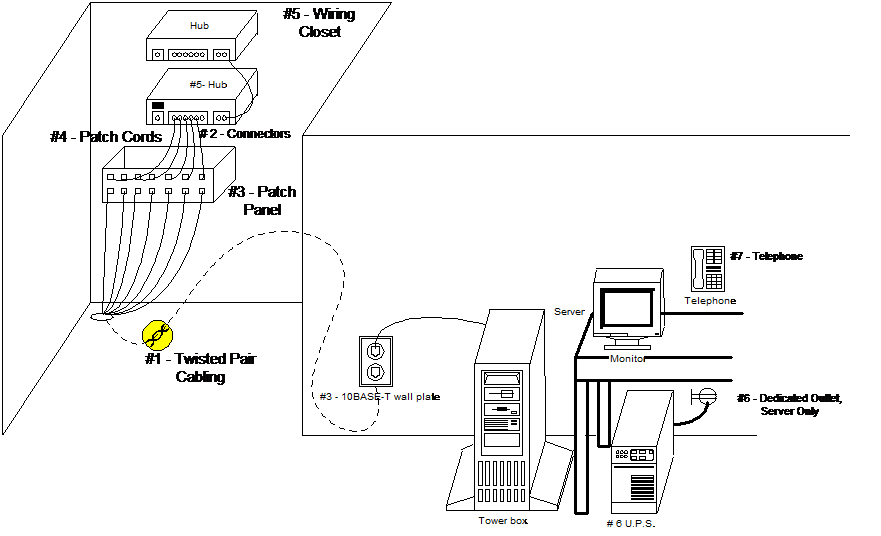 * NOTE: See the relevant
topic number in the Cabling Requirements section of this document for
each numbered item.
* NOTE: See the relevant
topic number in the Cabling Requirements section of this document for
each numbered item.
Hardware Specifications – Office Medicine version 10.9i
EMR/PPMS Workstation -
dual configuration
Operating
Systems supported:
1. Windows XP
Professional
2. Windows Vista
Business, Business-N, Enterprise, Ultimate
3. Windows 7
Professional, Ultimate
4. Redhat Desktop
5. Debian & other
generic Lynix
Workstation
Minimum Hardware Specification
Processor 1.80 GHz+
Memory 512 MB
40 GB Hard Disk
Network Card
USB ports (2)
EMR/PPMS
Server - dual configuration
Operating
Systems supported:
6. Windows 2003 – All
versions, 32 64 R2 etc.
7. Windows 2003 SBS
8. Windows 2008
9. Redhat AS & ES
10. Suse 10
- Debian
GNU
EMR/PPMS Server Minimum Hardware Specifications
Processor 2.0 GHz+
Memory 1-16 Users 4 GB
Memory 16-25 8 GB
2-72 GB ATA 10,000 Hard Disks Raid 1 mirror
or equiv. SCSI
Network Cards (2)
External US Robotics V92 modem
Backup solution
Additional
EMR Quality Assurance recommendations:
1.
800MHz
or higher FSB) and RAID capable. The system shall
employ a CPU with performance capabilities equivalent to AMD quad core or Intel
Xenon or Dual Core.
2.
Chipset
E7520 or better
3.
Processor
shall have a minimum or comparable 1024K Level-2 cache.
4.
System
will utilize a minimum ATA 10,000 or Ultra-320 SCSI technology for external and
internal interfaces.
5.
System
unit shall include at least one unused and available serial port capable of
operating at speeds of 115,200 bits per second with an external DB-9.
6.
System
unit shall include at least two USB version 2.0 ports.
7.
System
unit shall be capable of maintaining system time while the system is disconnected
from all external power sources for a period of one hour.
8.
System
unit shall be capable of maintaining system configuration (i.e. setup and
system BIOS) settings while the system is disconnected from all external power
sources for a period of one hour.
9.
System
unit shall have system management capable BIOS.
10.
System
as built shall be certified with operating System as installed by the
manufacturer.
11.
System
unit shall be capable of booting without keyboard and mouse.
12.
Motherboard
chipset shall be certified to be compatible with system unit CPU type and
speed, and main memory type, speed, and amount as certified by the CPU
manufacturer.
System Unit Options:
13.
System
shall have the option of an additional matching processor.
14.
System
unit shall have the option of a redundant power supply capable of online
fail-over operation per the power supply requirement detailed below in the
Environmental subsection.
15.
System
units shall have the option to be procured in a tower case design or rack mount
configuration.
16.
System
unit will support a remote management system as an available option.
Memory:
17.
System
unit shall provide RAM expansion capability to at least 4GB without replacement
of the memory supplied to meet the minimum initial memory requirement.
Network:
18.
System
unit shall provide dual channel NICs capable of IPSec, 10/100BaseT, with load
balancing and fail over support via RJ45 connection.
19.
The
network interface shall be capable of being disabled or removed without system
board (motherboard) replacement.
20.
The
network interface shall support Wake-on-LAN (WOL).
Network Options:
21.
System
shall have a 56KB v92 PCI card modem as an available option.
Media Storage:
22.
System
unit shall have an option of two hot-swappable 10,000 rpm 73GB ATA or Ultra 320
SCSI hard drives.
23.
System
unit shall be provided with an internal DVD/CD-ROM drive.
24.
System
unit shall have a dual channel RAID controller capable of multiple RAID levels
being configured on separate channels (e.g. channel 1 configured for RAID 1 and
channel 2 configured for RAID 5). The dual channel controller shall provide at
least one each internal and external connections. The controller shall be
capable of being disabled or removed without system board (motherboard)
replacement.
Graphics Interface:
25.
The
graphics interface shall be capable of being disabled or removed without system
board (motherboard) replacement.
Graphics Interface
Options:
26.
System
shall provide for support for any of the optional monitors below.
Sound:
27.
Not
required.
Environmental:
28. The system power
supply shall operate at a nominal input voltage of 115VAC and with a power
rating that supports a fully loaded system running at a 100% duty-cycle 24
hours a day, 365 days a year. A fully loaded system is defined by this
specification as:
·
All
expansion slots and ports are populated with devices certified for operation in
said system by the system Vendor;
·
Processor,
memory and internal storage are configured at the maximum allowable level as
documented by the system Vendor.
The aforementioned power requirement(s) are
to be fulfilled without modification to said system, peripherals or power
supply. The aforementioned requirement(s) apply equally to systems with a
single power supply configuration, as well as a system with an online fail-over
power supply configuration. Failure to meet these requirements, to the letter,
will void any contract.
29. The system shall
include all requisite ventilation and cooling apparatus to operate in an office
environment.
30. The system unit shall carry
an FCC Class A rating.
31. The system shall be
capable of normal operations in ambient temperatures from 65 to 90 degree F.
32. The system shall be
capable of normal operations in environments with a non-condensing relative
humidity of 20% to 80%.
Remote Support Requirements
Telecommunications Requirements
If you will be
taking advantage of our ASP solution, a high-speed internet connection must be
established. This can be DSL, T-1 or a type of phone line that will allow
enough “bandwidth” for the Office Medicine (tm) By Digital Medical Solutions
Inc. to perform acceptably. Bandwidth is essentially the amount of data that
can transmit through the phone line at one time before the line jams up. Our
preferred business partner, RTS, will consult with you to determine the
bandwidth you will require. A rough estimate it to multiply 32 by the number
of users you plan to have on the system. That will give you the total
bandwidth required for your system. This is only an estimate and other factors
may increase or decrease this number so please allow us to help you gauge what
you will require.
Installation of
high-speed telephone lines can take any where from six to eight weeks. This is
what we call the “long pole in the tent”, and nothing else can happen (in an
ASP environment) until the phone line is established. Your Implementation
Liaison will adjust your implementation project plan so that it works around
the installation of your telephone line. Training and Go Live cannot occur
until the phone line is in place and has been tested.
Regardless of
whether you are implementing ASP or Practice Hosted, the Office Medicine (tm)
system must have one workstation or server set up with an external modem. This
modem needs to be connected to a dedicated analog telephone line that is rated
for data. The modem will be used by Office Medicine (tm) Technical Support for
training, troubleshooting, and updating purposes. It will also be used to
transmit data to any of the intermediaries, which accept electronic billing.
Inventory List Of ALL Equipment
That Will Be Used With Office Medicine (tm) By Digital Medical Solutions Inc.
Please complete
the below sheet and return to your Implementation Liaison as soon as possible:
SERVER At
ASP Hosting Center At Physician’s Office
If not ASP,
brand of machine __________________________________ Processor _________ MHz
________
RAM
______________ HDD ___________
WORKSTATION(S)
Total number of
workstations: ____________
Please list
detail of each machine NOT PURCHASED FROM OUR PREFERRED BUSINESS PARTNER that
you plan to use with Office Medicine (tm) By Digital Medical Solutions Inc.,
and quantity of each type
Brand of
machine _____________________________ Processor ____________ MHz
___________
RAM
_______________ HDD _________________
Brand of
machine _____________________________ Processor ____________ MHz
___________
RAM
_______________ HDD _________________
Brand of
machine _____________________________ Processor ____________ MHz
___________
RAM
_______________ HDD _________________
PRINTERS
Please list each
printer NOT PURCHASED FROM OUR PREFERRED BUSINESS PARTNER that you plan to use
with Office Medicine (tm) By Digital Medical Solutions Inc., and what function
you expect it to perform. For example, “Hewlett Packard Laser 1100 – print
HCFAs”
_____________________________________________________________________________________
_____________________________________________________________________________________
OTHER EQUIPMENT
Please list any other
equipment in your office NOT PURCHASED FROM OUR PREFERRED BUSINESS PARTNER that
you plan to use with Office Medicine (tm) By Digital Medical Solutions Inc..
_____________________________________________________________________________________
_____________________________________________________________________________________
Backing Up Your Data
System backup
is your insurance policy. Should catastrophe strike you must be able to revert
to a copy of your system and establish that backup on to a new system.
Our backup
policy is that you make a full-system backup once a week, and a backup daily of
the ENTIRE Office Medicine (tm) By Digital Medical Solutions Inc. product
(program files and data) and any other software product that you use on a daily
basis. We also state that the each daily backup is stored on separate media
than the previous days backup. For example, if your office is open Monday
through Friday, you should have five backup tapes for the week. Each Monday
you use Monday’s tape, each Tuesday use Tuesday’s tape, etc. Therefore, if a
catastrophe were to happen you would have five tapes to go back to in the event
that one was damaged.
Section Eight
Contacting Office Medicine (tm)
Accounting Questions
We log all contact with our
clients in our call management system. Therefore, you can log a call for the
accounting department through our regular help desk (888-927-7774) or by
calling the main switchboard and asking for the Office Medicine (tm) accounting
department (941-473-3785).
Software Support Questions
Software support is available 8am
to 8pm Eastern Standard Time. The toll free support number is (888) 927-7774
or (888)712-0091.
Hardware Maintenance Questions
Hardware maintenance is managed
by our Hardware Orders Fulfillment Business Partner. You can reach them at:
Real Time Systems -- #
Services Group directly -- #
Office Medicine (tm) Contact
List and Escalation Procedures
We log all contact with our
clients in our call management system. Therefore, we ask that any question you
have be funneled through our support lines so that the call can be logged and
routed properly. We will make every effort to maintain an acceptable hold time
and call back time. If, however, you are not satisfied with the level of
service you receive, please do not hesitate to contact one of the below listed
managers.
Manager,
Education and Implementation Susan Sobson (941) 544-3863
Manager,
Support Services Larry Spearman (586) 945-9512
Director
of Client Services Carol Harris (586) 634-6422