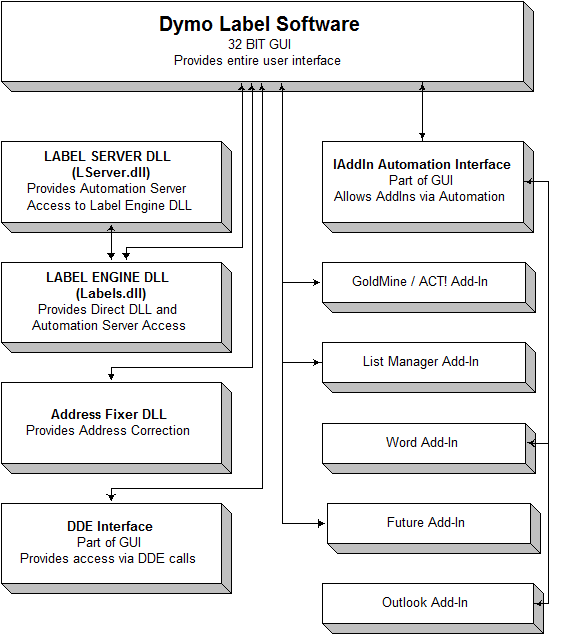
The two high level DLS interfaces (IAddIn OLE Automation and
DDE) provide very simple and often-used functions to interact with the DYMO
Label Software application such as printing labels, loading/saving labels,
changing text in the label objects, etc. Because of this, the main focus of
these DLS interfaces is for writing small, simple programs. As examples of such
programs, besides the samples included in this SDK the Word and Outlook
Add-In’s both use the IAddIn Automation for their operation.
As is shown in the Figure on page 6, the IAddIn OLE
Automation is part of the DLS application itself (the GUI). It operates as a
universal out-of-process OLE Automation Server that provides integration with
any OLE capable application. Its primary use is for simple label printing needs
such as on demand address or bar code label printing.
IAddIn Automation exports two OLE Interfaces, IDYMOAddIn and
IDYMOLabels. The OLE class names for these two Interfaces are:
DYMO.DYMOAddIn
DYMO.DYMOLabels
IDYMOAddIn implements functions that affect the program
operation itself, whereas IDYMOLabels implements functions that pertain to the
current label design itself.
The IDYMOAddIn Interface provides the following
program control functions:
Open (const FileName: WideString)
Opens a
label file. Returns TRUE on success, FALSE on error.
Save ()
Saves the current label. Returns TRUE on success, FALSE on error.
SaveAs (const
FileName: WideString)
Saves the current label under a
new name. Returns TRUE on success, FALSE on error.
FileName This
property returns the name of the currently open file.
Print(Copies:
Integer; bShowDialog: WordBool)
Prints the
current label. Copies is the number of copies to print. bShowDialog controls
the display of the print-progress dialog. If TRUE, then the dialog will be
displayed. Returns TRUE on success, FALSE on error.
Hide()
Hides the program, removing it from the taskbar.
Quit()
Shuts down the program. Use this with caution, this can cause Windows errors.
It is best to let Windows start/stop the program.
Show ()
Shows the program, and brings it to the foreground.
SelectPrinter
(PrinterName)
Redirects output to the selected printer. PrinterName
is of the form “Printer name” on “Port.” Returns TRUE on success, FALSE on
error.
Example:
To select the LabelWriter EL60 on COM3, you would use the command:
SelectPrinter(DYMO LabelWriter EL60 on COM3:)
SysTray (State:
WordBool)
Places the program in the system
tray when State is True, and removes it from the system tray if State = False.
The IDYMOLabels Interface provides the following
functions for controlling the appearance of a label:
GetObjectNames
(bVariableOnly: WordBool)
Returns a
list of objects on the label. If bVariableOnly is TRUE, then the list will
contain only those objects that can be pasted into. This includes Address, Bar
code, and Text objects with the bVariable property set to TRUE. If bVariableOnly
is FALSE, then all objects on the label will be returned. The vertical-bar ‘¦’
character separates each object in the list. Example: “Text¦Address¦Logo.” See
DDE Fields description.
GetText (const
Field: WideString)
Given an
object name (Field), returns the contents of the object. This operation only
applies to Address, Bar Code, and Text objects.
SetAddress
(AddrIdx: Integer; const Address: WideString)
Given an index of an address
object, places the text in the object. The index is normally 1, but for designs
with more than one address object, the index may be greater than one to select
other address objects. Returns TRUE on success, else FALSE.
SetField (const
Field, Text: WideString)
Given an
object name, and some text, changes the text of the object to have the new
text. This operation only applies to Address, Bar Code, and Text objects.
Returns TRUE on success, else FALSE.
POSTNET (Index:
Integer; const Position: WideString)
Given an index of an address
object, changes the POSTNET bar code setting for the object. The index is
normally 1, but for designs with more than one address object, the index may be
greater than one to select other address objects. Position may be “NONE,”
“TOP,” or “BOTTOM.”
AddressFieldCount
This
property returns the number of address objects on the current label. It can be
used to determine possible values for the index parameter of the POSTNET and
SetAddress functions.
DDE always involves two applications: a Client (your own
application) and a Server (DLS). Using DDE, your application sends data and
commands to the DLS application, in effect operating DLS via remote control. In
all cases, you will be using the DLS application as the Server and adding DDE
Client capabilities to your application.
The DLS interface using DDE provides similar label printing
capabilities to that provided by IAddIn Automation. Its primary use is for
simple label printing needs such as on demand address or bar code label
printing.
DDE commands are all executed using DDE Execute commands.
Prior to sending an execute command to the server, the Status item must be in
the ‘Ready’ state. If the Status is not in the ‘Ready’ state, all commands sent
to the server will be ignored.
Multiple DDE commands may be combined, up to a maximum
string length of 255 characters. Multiple commands may be separated by commas.
For example, the command string:
Open(MYFILE.LB0), Paste(Address), print, hide
will open the label file MYFILE.LB0, paste the clipboard’s
contents into an object on the label called ‘Address’, print the label, and
then hide the application.
DDE commands sent to DLS may use carriage return/line feed
characters (decimal 13,10) or “Pipe” characters (‘¦’, decimal 124) to indicate
line breaks. For example, to set an object called Address to contain the text:
Acme Industries
123 Main St.
Anytown, CA 99812-1234
You would send the command:
SetObjectText (Address, Acme Industries¦123 Main
St.¦Anytown, CA 99812-1234)
To establish a DDE conversation, the DDE client must specify
an Application or Service Name and a Topic. If the server application is
running, the conversation is established. If not, applications must launch the
server application and try again.
Executable Name: DYMOLBL.EXE
DDE Application/Service Name DYMO
DDE Topic Name SYSTEM
The path to the executable can be found in the Registry at
HKEY_LOCAL_MACHINE\SOFTWARE\Dymo-CoStar\LabelWriter\InstallPath
The DYMO Label Software responds to the following DDE items:
Status Returns
current DDE status as a string. The returned string will be either ‘Busy’ or
‘Ready.’
The Status item is used to check
the current status of the DYMO Label program. When the program is ready to
accept new commands, a DDE Request of the Status item will return ‘Ready.’ When
the program is processing a command, a DDE Request of the Status item will
return ‘Busy.’ When the program is done processing a command, the DDE Request
will once again return ‘Ready.’
Fields Returns
a list of the names of all objects on a label as a null-terminated string. The
object names are separated by the “Pipe” character, (‘¦’, decimal 124) and the
last character is followed by a null (decimal 0). For example, a typical
shipping label with a return address and logo would return the following when
it receives a request of the Fields item:
RETURN ADDRESS¦LINE¦LOGO¦ADDRESS
LastError When a
command fails, the LastError item returns a descriptive (but brief) textual
error message and the Status reverts to Ready. If the LastError item is read
while the status is Busy or Ready, it returns ‘No error.’ Other possible error
codes include:
|
Error Message
|
|
|
Command error
|
The format of the command string was incorrect.
|
|
Open file error
|
The Open command specified a file that was not found.
|
|
Print error
|
An error occurred while trying to print the label.
|
|
Object not found
|
A Paste or SetObjectText command specified an object that
was not found on the label.
|
|
Unknown Command
|
The command was not found, or was syntactically wrong.
|
NOTE: All strings (label object names, text, number of
copies, filenames, etc.) are represented by standard C-style null-terminated
strings. If you are using Delphi, you may need to use the StrPCopy () procedure
to convert a Pascal string to a null-terminated string.
The following list represents all available DDE commands.
The commands are all performed using the DDE Execute command of the client
application.
Exit Shuts down DLS. If the template has been modified via DDE calls, the user is NOT prompted to save changes to the
file.
Maximize Maximizes DLS to full screen
Minimize Minimizes DLS to an ICON.
MiniTool Minimizes DLS to the System Tray.
Restore Restores DLS to normal size.
Hide Hides the DLS program.
Show Shows the DLS program if it was hidden.
Print Prints the current label, as is.
Copies(nCopies) Sets the number of
copies of a template to be printed.
Example:
Copies(4)
Open(FileName) Opens the
specified label file.
Example:
Open(C:\LABELS\\MYLABEL.LB0)
Paste(ObjectName) Pastes the text from
the clipboard into the specified object’s text property. If the object has no
text property, the command is ignored.
Example:
Paste(Address)
SetObjectText(Object Name, Text) Similar to the
Paste command, except the text in the object is specified as part of the
command.
Example:
SetObjectText(Text," + rst![ProductName] + ")"SelectTemplate(TemplateName)
Opens a
template file. This is equivalent to picking a new template from the drop-down
list. The “TemplateName” parameter must match the entire name as it appears in
the drop-down list. The Template Name is not case sensitive.
Example:
SelectTemplate(Shipping, UPS (30258))
SetImageFile(ObjectName, FileName)
Replaces
the specified graphic object’s image with an image read from the specified
file. The file name should contain the complete drive and path information for
the file.
Example:
SetImageFile(Logo, C:\CLIPART\MYLOGO.PCX)
PastePicture(ObjectName)
Copies an
image from the clipboard into the specified picture object.
Example:
PastePicture(Photograph)
SelectPrinter(Name) Redirects output to the
selected printer. Name is of the form “Printer name” on “Port.”
Example:
To select the LabelWriter EL60 on COM3, you would use the command:
SelectPrinter(DYMO LabelWriter EL60 on COM3:)
POSTNET(nSetting) Modifies the POSTNET
bar code setting for all addresses on a label. nSetting may be 0, 1, or 2, and
sets the position of the POSTNET bar code as follows:
0 = No bar code
1 = Print bar code above the address
2 = Print bar code below the address
Example:
Postnet(1)
The low-level DLS interfaces provide developers full control
of the label printing process. Printing, saving, loading labels; Creating new
ones and modifying existing ones; Access to any properties of any object on the
label – all these can be done using any of low-level DLS interfaces. This type
of DLS interface was even used to write user-interface components of DLS
itself.
As is shown in the Figure on page 6, ILabelEngine OLE
Automation is implemented in the Label Server DLL (LSERVER.DLL). This DLL
operates as an in-process (in-proc) OLE Automation Server that provides
integration with any OLE capable application. ILabelEngine Automation is far
more powerful (and trickier to use) than IAddIn Automation. It is targeted for
those needing to have complete control over the design, printing and preview of
labels. If your application requires on-the-fly label design, then this DLS
interface is appropriate. If all you need to do is open a label file change the
contents of an object, and print it, then it is recommended that you use IAddIn
Automation instead.
Because of the high level of control provided by this
Automation Server, it exports a number of OLE Interfaces as shown in the table
below, all of which are accessible via the ILabelEngine Interface.
|
Interface Name
|
OLE Class Name
|
|
ILabelEngine
|
DYMO.LabelEngine
|
|
ILblInfo
|
DYMO.LblInfo
|
|
ILabelList
|
DYMO.LabelList
|
|
IObjectsAtEnum
|
DYMO.ObjectsAtEnum
|
|
IObjectList
|
DYMO.ObjectList
|
|
IVarObjectList
|
DYMO.VarObjectList
|
|
ITextAttributes
|
DYMO.TextAttributes
|
|
IPrintObject
|
DYMO.PrintObject
|
|
ILabelObject
|
DYMO.LabelObject
|
|
ITextObj
|
DYMO.TextObj
|
|
IAddressObj
|
DYMO.AddressObj
|
|
IGraphicObj
|
DYMO.GraphicObj
|
|
IRectObj
|
DYMO.RectObj
|
|
ILineObj
|
DYMO.LineObj
|
|
ICounterObj
|
DYMO.CounterObj
|
|
IBarCodeObj
|
DYMO.BarCodeObj
|
|
IDateTimeObj
|
DYMO.DateTimeObj
|
The Object Model for the Label Server DLL is shown in the
two figures that follow: 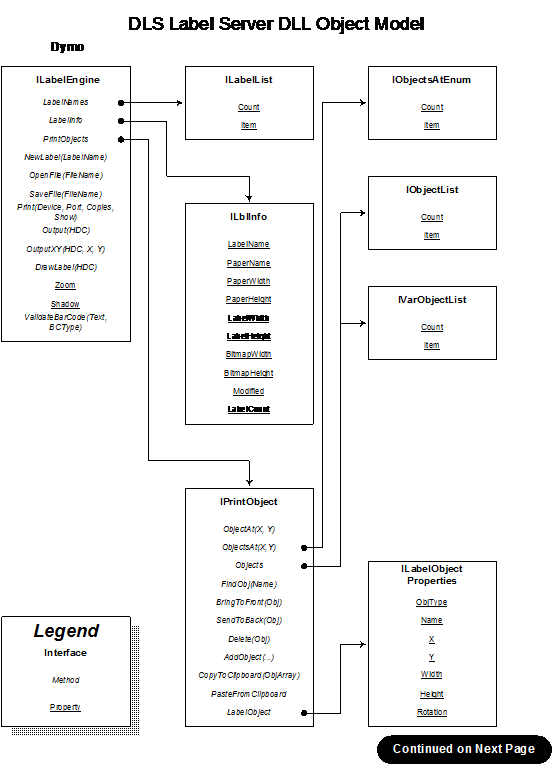
Figure 2
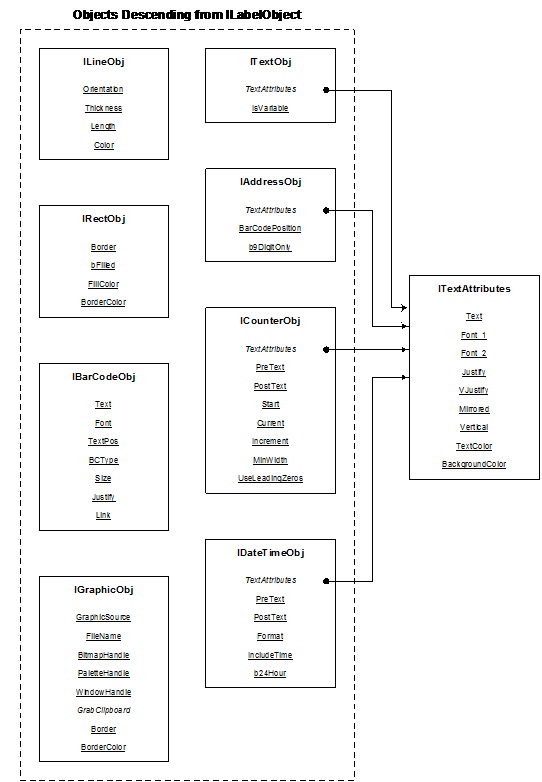
Figure 3
The descriptions of the OLE Interfaces provided by the Label
Server DLL are as follows:
This is the main Interface. The methods and properties
supported by this interface apply to entire label designs, and include such
things as Open, Save, Print, etc.
This Interface is also used to return the ILabelList
Interface for the collection Object, the ILblInfo Interface with label specific
information, and the IPrintObject Interface for label object level
manipulations.
Properties and Methods:
Zoom This
Read/Write Integer property is used for setting the ZOOM level percentage used
when rendering a label on screen using the DrawLabel method. The value set must
be between 20 and 400, inclusive.
Shadow This
Read/Write Boolean property is used for turning the label shadows on and off
when drawing a label on-screen. If the value is TRUE, then shadows will be
added. After this value is written, the bitmap used for rendering the label is
resized, so the LabelInfo.BitmapWidth and BitmapHeight values should be reread.
NewLabel(LabelType:
String)
This
method is used for creating a new label design. It takes a single parameter,
LabelType, which must correspond to one of the strings returned via the
LabelList collection Object. Returns TRUE on success, FALSE otherwise.
OpenFile(FileName:
String)
Used to
read a pre-existing label file. Filename is the name (with optional drive and
path information) of the file to be read. If no drive or path is given, the
current directory is used. Returns TRUE on success, FALSE otherwise.
SaveFile(FileName:
String)
Saves the
current label. Filename is the name (with optional drive and path information)
of the file to be read. If no drive or path is given, the current directory is
used. Returns TRUE on success, FALSE otherwise.
PrintLabel(DeviceName:
String, Port: String, Quantity: Integer, bShowDialog: Boolean)
Used to
print the current label. DeviceName is the name of the device (e.g. “DYMO LabelWriter
Turbo”). Port is the port on which the printer is connected. If “File:” then
output will be directed to a file. Quantity is the number of copies to be
printed, and bShowDialog is a boolean used to display (TRUE) or hide (FALSE)
the print progress dialog. Returns TRUE on success, FALSE otherwise.
Output(DC:
Integer) This method may be used to print a label to a selected device
context. Returns TRUE on success, FALSE otherwise.
OutputXY(X,Y,DC:
Integer)
This
method is used to print the current label on the passed device context, OFFSET
by X and Y TWIPS. This is especially useful for “rubber Stamping” the same
label multiple times on a sheet of labels. To do this, retrieve the DC of the
printer, and call BeginDoc. Then, call this method once for each label on a
sheet, passing the X and Y coordinates for each of the labels. When done, call
EndDoc. Returns TRUE on success, FALSE otherwise.
DrawLabel(DC:
Integer)
Use this
method to draw the label on-screen with the current shadow and zoom properties.
DC is the device context of the window in which to draw the label.
LabelNames This
method returns an Interface to the ILabelList collection Object used to
retrieve the names of all labels defined in the DEF file. (See Ref).
LabelInfo This
method returns an Interface to the ILblInfo Object. (See Ref).
PrintObject This
method returns an Interface to the IPrintObject Object. (See Ref).
This Interface to the collection Object is used to obtain a
list of all supported labels. This list of labels is defined in the LABELS.DEF
file. The Interface uses the IEnumVariant Interface to support the Count and
Item properties.
Properties and Methods:
Count Read
Only. Returns the number of label definitions available.
Item(Index:
Integer)
Read Only.
Returns the name of the given label definition.
This Interface has properties that can be used to obtain
information about a given label, including its size, name, paper type, etc. All
properties are read only.
Properties and Methods:
LabelName The
name of the label (from the DEF file). E.g. “Address Label (30252).”
PaperName The
name of the paper that will be selected when this label is being printed.
Paper Width The
width of the paper, in TWIPS.
PaperHeight The
Height of the paper, in TWIPS.
BitmapWidth The
width of the bitmap used to render the label on screen, in PIXELS.
BitmapHeight The
height of the bitmap used to render the label on screen, in PIXELS.
Modified TRUE
if the label has been modified by the user, else FALSE.
This Interface is used for obtaining information about
objects on a label. Many of the properties and methods take an object ID. These
object ID’s may be obtained by the ObjectAt, ObjectsAt, FindObj, or AddObject
methods.
Properties and Methods:
ObjectsAt(x,y:
Integer)
This method
returns an Interface to the IObjectsAtEnum collection Object. (See below).
It is used to get the ID’s of all objects that include a given point on the
label, as might be required when the user is trying to select a particular
object. X any Y are expressed as offsets from the upper left corner of the
label, in TWIPS.
Objects:
IObjectList
This
method returns an Interface to the IObjectList collection Object. (See below).
It may be used to get the ID’s of all objects on a label.
LabelObject(Obj:
Integer)
This is
used to return an ILabelObject Interface of an object on the label with the ID
of Obj. (See below).
FindObj(Name:
String)
Returns
the ID of the object with the name Name. If the object is not found,
returns 0.
ObjectAt(X,Y:
Integer)
Returns
the ID of the top-most object on the label at point X, Y (in TWIPS). If no
object is at the point, returns a 0. Not to be confused with ObjectsAt(x,y).
BringToFront(Obj:
Integer)
Moves the
object with the given ID to be on top of, or in the foreground, of all other
objects on the label.
Delete(Obj:
Integer)
Deletes
the object with the ID of Obj.
SendToBack(Obj:
Integer)
Moves the
object with the given ID to be on below, or in the background, of all other
objects on the label.
AddObject(ObjType:
Integer, Name: String; X,Y, Width, Height: Integer; Rotation: Integer
This
method is used to create a new object on the label. ObjType is an integer that
specifies the type of object to be created, where:
0 – TEXT
1 – ADDRESS
2 – GRAPHIC
3 – RECTANGLE
4 – LINE
5 – BARCODE
6 – COUNTER
7 – DATE_TIME
Name is the descriptive name to give the object (e.g. “Return Address” or
“Logo”, or “Product ID”, etc.)
X, Y, Width, and Height are the location (X,Y) of the upper left corner of the
object, along with the dimensions of the object, all expressed in TWIPS.
Rotation is the rotation to apply to the object, and must be 0, 90, 180, or
270. This value is ignored when adding line or rectangle objects.
After adding an object, the LabelObject method can be used to provide the object-specific
settings for the newly created object.
This function returns the ID for
the new object, or 0 if the object could not be added.
This collection Object may be used to obtain the ID’s of all
objects on a label that contain the point X,Y in Twips. It uses the
IEnumVariant Interface to support the Count and Item properties.
Properties and Methods:
Count Read
Only. Returns the number of objects that contain the point.
Item(Index:
Integer
Read Only.
Returns the ID of the object.
This collection Object may be used to obtain the ID’s of
every object on a label. It uses the IEnumVariant Interface to support the
Count and Item properties.
Properties and Methods:
Count Read
Only. Returns the number of objects that are on the label.
Item (Index:
Integer)
Read Only.
Returns the ID of the object.
This collection Object may be used to obtain the ID’s of
every object on a label that can be pasted into. It uses the IEnumVariant
Interface to support the Count and Item properties.
Properties and Methods
Count Read
Only. Returns the number of variable objects on the label.
Item (Index:
Integer)
Read Only.
Returns the ID of the object.
This Interface is used to obtain specific information about
an object on a label, including its name, size, rotation, type, and more. It is
supported by all object-specific Interfaces, and can be obtained via a
QueryInterface call on ITextObj, IAddressObj, IGraphicObj, IDateTimeObj,
IRectObj, ILineObj, and ICounterObj Interfaces. Likewise, after checking the
type property of a ILabelObject, one can use QueryInterface to obtain the
actual object Interface.
Properties and Methods:
ObjType Read
Only. Returns the type of object the LabelObject corresponds to. Possible
values are:
0 – TEXT
1 – ADDRESS
2 – GRAPHIC
3 – RECTANGLE
4 – LINE
5 – BARCODE
6 – COUNTER
7 – DATE_TIME
Name Read/Write.
This is the descriptive name of the object..
X Read/Write.
Sets the left edge of the object, relative to the paper, in TWIPS.
Y Read/Write.
Sets the top edge of the object, relative to the paper, in TWIPS.
Width Read/Write.
Sets the width of the object, in TWIPS
Height Read/Write.
Sets the height of the object, in TWIPS.
Rotation Read/Write.
Sets the rotation of the object, in degrees. Must be 0, 90, 180, or 270.
Ignored by Line and Rectangle objects.
This Interface is available from the Text, Address, DateTime
and Counter Interfaces. It is used to manipulate the text, fonts,
justification, and other rendering attributes for the objects.
Properties and Methods:
Text Read/Write.
This is the string displayed by Text and Address objects. This property is
ignored by the Date/Time and Counter objects.
Font_1 Read/Write.
This is the font name, style, and size used for the first line of text in an
object. Fonts are represented by strings in the following form:
“<Font Name>, <Size>, <Style(s)>”
Example: “Times New Roman, 12, Bold”
Styles may be any combination of Bold, Italic, Underline, and Strikeout
Font_2 Read/Write.
Used only by the Text and Address objects, this provides the font for
subsequent lines of text. This property is ignored by the Date/Time and Counter
objects.
Justify Read/Write.
Provides access to the justification setting for the text, where:
0 = Left Justify
1 = Center Justify
2 = Right Justify
3 = Center Block
VJustify Read/Write.
Provides access to the vertical justification. It can be any of:
0 = Justify to top of bounds
1 = Center between top and bottom
2 = Justify against bottom of bounds
Mirrored Provides
access to mirrored text setting for the object, where:
FALSE = Print Normally
TRUE = Print text mirrored across Horizontal axis (or vertical axis if rotated
90 or 270 degrees).
Vertical Provides
access to the Vertical Text setting of the object, where:
FALSE = Print Normally
TRUE = Print each letter on a line by itself.
When TRUE, only the first line of
the text will be printed. All subsequent text will be ignored.
TextColor Read/Write.
Provides access to the color of the text
BackgroundColor Read/Write.
Provides access to the background color of the object
This is the Interface used to manipulate Text objects. The
ITextObj Interface must be obtained via a QueryInterface on a ILabelObject
Interface with the Type property = Text.
Properties and Methods:
TextAttributes Returns
an ITextAttributes Interface.
IsVariable
Read/Write.
This boolean property is used to tag an object as one that can be pasted into.
If True, then the object may be pasted into programmatically. If False, the
object can only be changed via direct editing.
This is the Interface used to manipulate Address objects.
The IAddressObj Interface must be obtained via a QueryInterface on a
ILabelObject Interface with the Type property = Address.
Properties and Methods:
TextAttributes Returns
an ITextAttributes Interface.
BarCodePosition Read/Write.
Used to set the position for the POSTNET bar code, where:
0 = Suppress POSTNET printing for this object
1 = Print POSTNET above the address
2 = Print POSTNET below the address
b9DigitOnly Read/Write.
If this property is TRUE, then POSTNET bar codes will only be printed for
addresses with full 9 digit (ZIP+4) codes. If FALSE, then 5 and 9 digit POSTNET
bar codes will be printed. When printing 9 digit ZIP codes, the full 11 digit
Delivery Point Bar Code (DPBC) will be printed.
This is the Interface used to manipulate Graphic objects.
The IGraphicObj Interface must be obtained via a QueryInterface on a
ILabelObject Interface with the Type property = Graphic.
Properties and Methods:
FileName Read/Write.
Provides the name of the bitmap file to displayed.
BitmapHandle Read/Write.
Provides the handle of the bitmap to be displayed by the object.
PaletteHandle Read/Write.
Provides the handle of the palette to be used in association with the bitmap
handle.
WindowHandle Write
only. Provides the handle of a window to be captured for display by the object.
Border Sets
the type of border to draw around the image, where:
0 = No Border
1 = Thin Border
2 = Thick Border
BorderColor Read/Write.
Provides access to the color of the object’s border.
GraphicSource Read/Write.
Is used to specify the type of bitmap being passed to, or returned from the
object. Possible values include:
0 = Source image is a file on disk. FileName has the full path to the file
1 = Source image is a bitmap or metafile whose handle is in the Picture field.
If Picture corresponds to a bitmap (GetObjectType(Picture) = OBJ_BITMAP) then
Palette represents the palette of the bitmap. If the object type is a metafile,
then Palette is undefined.
2 = Source image is to be captured from the Window whose handle is contained in
Window. (Valid only on Setting the attributes for the object. Once captured,
the image information is returned as a bitmap handle in the Picture field.)
3 = Source image is in Clipboard. (Valid only on Setting the attributes for the
object. Once captured, the image information is returned as a bitmap (or
metafile) handle in the Picture field.).
GrabClipboard The
method is used to load an image from the clipboard.
This is the Interface used to manipulate Line objects. The
ILineObj Interface must be obtained via a QueryInterface call on a ILabelObject
Interface with the Type property = Line.
Properties and Methods:
Orientation This
Read/Write property provides the orientation of the line, where:
0 = Horizontal Line
1 = Vertical Line
Thickness This
Read/Write property provides the thickness of the line, where
0 = No Line – 0 TWIPS
1 = Thin Line – 15 TWIPS
2 = Medium-Thin – 30 TWIPS
3 = Medium Line – 45 TWIPS
4 = Medium-Thick – 80 TWIPS
5 = Thick Line – 115 TWIPS
LineColor Read/Write.
Provides access to the color of the line
This is the Interface used to manipulate Rect objects. The
IRectObj Interface must be obtained via a Query Interface on a ILabelObject
Interface with the Type property = Rectangle.
Properties and Methods:
Border Sets
the style of border to draw around the image, where:
0 = No Border
1 = Thin Border
2 = Thick Border
bFilled Read/Write.
If TRUE then the rectangle is filled by the color specified by the FillColor
property.
FillColor Read/Write.
If the bFilled property = TRUE then this specifies the color to fill by,
otherwise ignored.
BorderColor Read/Write.
Provides access to the color of the border.
This is the Interface used to manipulate Bar Code objects.
The IBarCodeObj Interface must be obtained via a Query Interface on a
ILabelObject Interface with the Type property = BarCode.
Properties and Methods:
Text Read/Write.
Provides the data to be formatted. This string can be up to 255 characters in
length.
Font Read/Write.
This string represents the font to be used for the Human readable text. For
format information, see the Font_1 description for the ITextAttributes
Interface.
TextPos Read/Write.
The position where the Human Readable text is to be printed. Possible values include:
0 = No text printed
1 = Above the bar code
2 = Below the bar code
BCType Read/Write.
Provides the type of bar code to be printed. Supported types include:
0 = Code 39 (Code 3 of 9)
1 = Code 39 w/Mod 43 Checksum
2 = Code 128 Auto
3 = Code 128A
4 = Code 128B
5 = Code 128C
6 = Code 2 of 5
7 = UPC A
8 = UPC E
9 = EAN 8
10 = EAN 13
11 = Codabar
12 = POSTNET
13 = Code 39 Library Version L – R Checksum
14 = Code 39 Library Version R – L Checksum
15 = Codabar Library Version L – R Checksum
16 = Codabar Library Version R – L Checksum
17 = ITF-14
18 = EAN-128
Size Read/Write.
Provides the size of the bar code to be printed. The library supports three
sizes, and they may be selected as follows:
0 = Small
1 = Medium
2 = Large
Justify Read/Write.
Provides the horizontal justification of the bar code within its object bounds.
It can be any of:
0 = Left Justify
1 = Center Justify
2 = Right Justify
Link If
zero, then the data to be bar coded is taken from the Text field of the bar
code object. If non-zero, then it the data to be bar coded is taken from the
object with an ID that corresponds to the Link value. If non-zero, then the
Link value must be the ID of a Text, Address, or Counter object.
This is the Interface used to manipulate Counter objects.
The ICounterObj Interface must be obtained via a Query Interface on a
ILabelObject Interface with the Type property = Counter.
Properties and Methods:
TextAttributes Returns
an ITextAttributes Interface.
PreText Read/Write.
Provides the text (if any) to appear before the counter value. This must
be no more than 31 characters in length.
PostText Read/Write.
Provides the text (if any) to appear after the counter value. This must
be no more than 31 characters in length.
Start Read/Write.
This integer provides the value the counter starts counting from.
Current Read/Write.
This is the current value of the counter. It is incremented each time the label
is printed.
Width Read/Write.
Specifies the minimum width to format the counter to.
Increment Read/Write.
This integer value specifies the amount to increment the Current value by after
each label is printed. To count down, this value should be negative.
UseLeadingZeros Read/Write.
If TRUE, then the value is printed with leading zeros added to pad the width
out to Width. Otherwise, no padding is used.
This is the Interface used to manipulate DateTime objects.
The IDateTimeObj Interface must be obtained via a Query Interface on a
ILabelObject Interface with the Type property = DateTime.
Properties and Methods:
TextAttributes Returns
an ITextAttributes Interface.
PreText Read/Write.
Provides the text (if any) to appear before the counter value. This must
be no more than 31 characters in length.
PostText Read/Write.
Provides the text (if any) to appear after the counter value. This must
be no more than 31 characters in length.
Format Read/Write.
Provides the format to be used for the date and time. Available choices include
both US, and international standards. Possible values for Format include:
0 = Blank
1 = Friday, February 6, 1998
2 = Friday, 6 February, 1998
3 = February 6, 1998
4 = 6 February, 1998
5 = 2/6/1998
6 = 6/2/1998
7 = 2/6/98
8 = 6/2/98
9 = 2.6.98
10 = 6.2.98
11 = 1998-02-06
12 = 1998-06-02
13 = 6-Feb-98
14 = Feb 6, 1998
IncludeTime Read/Write.
If TRUE, then the time will be added after the date. If False, then only the
date will be printed.
b24Hour Read/Write.
If TRUE, then the time will be printed as 24-hour time (0-23), otherwise, it
will be printed as 12 hour (1-12) time.
The LABELS.DLL file provides the DLS interface for using DLL
calls. This label engine DLL may be used from any language that supports
Windows DLL calls. Like the low-level OLE DLS interface, the DLS interface
using DLL calls is far more complex than the DLS interfaces using IAddIn
Automation and DDE and is targeted at those needing to perform complex label
printing tasks.
All DLL calls use the standard windows calling conventions
(_stdcall). Parameters are passed from right to left, and the called function
is responsible for cleaning up the stack.
All functions that use string parameters use C-Style,
null-terminated strings.
Structures are given in both ‘C’ and Pascal formats. These
data structure definitions, as well as function prototypes and other useful
type definitions are defined in the lbltypes.h and lbltypes.pas
files that are included as part of the SDK.
The TLabelInfo structure is used to get information about
the current label.
C definition:
typedef struct tagLABELINFO {
char LabelName[64];
char PaperName[64];
POINT PaperSize;
POINT BitmapSize;
int LabelCount;
POINT LabelSize;
} TLABELINFO;
typedef TLABELINFO * PLABELINFO;
Pascal definition:
TLABELINFO = Record
LabelName : Array[0..63] of char;
PaperName : Array[0..63] of char;
PaperSize : TPoint;
BitmapSize : TPoint;
LabelCount : Integer;
LabelSize : TPoint;
End;
PLABELINFO = ^TLabelInfo;
Where:
LabelName Is a
null-terminated string giving the name of the label (e.g. ‘Address Label,’ or
‘2-up Address Label’)
PaperName Is a
null-terminated string giving the name of the paper stock this label is
designed for (e.g. ‘Address’). These names correspond to names of papers known
by the printer driver.
PaperSize This gives the X
and Y extends of the paper, in TWIPS.
BitmapSize This gives the
size of the bitmap required to hold the drawn label at the current Zoom level.
The dimensions given are in Pixels.
LabelCount Normally one,
contains the number of labels per page.
LabelSize Contains the
physical dimensions of the labels (in TWIPS). PaperSize provides the overall
dimensions, but when there is more than one label per sheet, the label size can’t
be determined. This entry provides the actual size of each label.
Object ID is a generic 32-bit handle. Internally, it points
to the specific object. It is used when whenever a specific object is being
referenced.
C definition:
typedef int TObjectID;
Pascal definition:
TObjectID = TObject;
This structure is when returning information about a
specific object.
C definition:
typedef struct tagObjectInfo {
TObjectID ObjID;
Int ObjType;
char ObjName[64];
RECT Size;
int Rotate;
} TOBJECTINFO;
typedef TOBJECTINFO * POBJECTINFO;
Pascal definition:
TOBJECTINFO = Record
ObjID : TObjectID;
ObjType : Integer;
ObjName : Array[0..63] of char;
Size : TRect;
Rotate : Integer;
End;
POBJECTINFO = ^TOBJECTINFO;
Where:
ObjID Is a handle to
the specific object. This can be passed to functions that manipulate objects,
to modify, delete, move, or make other modifications.
ObjType Is
an identifier that corresponds to the type of object. This read only field can
be any of:
|
Object Type
|
Identifier
|
|
Text
|
0
|
|
Address
|
1
|
|
Graphic
|
2
|
|
Rectangle
|
3
|
|
Line
|
4
|
|
Bar Code
|
5
|
|
Counter
|
6
|
|
Date/Time
|
7
|
ObjName Is a
null-terminated string giving the name of the object (e.g. ‘Return Address,’ or
‘Part Number’)
Size Is a RECT
that provides the X,Y location of the upper left corner of the object, along
with its width and height. All dimensions are in TWIPS.
Rotate Is one of
ROTATE_NONE, ROTATE_90, ROTATE_180, or ROTATE_270. (These are defined as
integers of 0, 90, 180, and 270).
This structure is used for setting or retrieving information
about the text that is displayed by Text and Address objects. With it, one can
determine the fonts, text, justification, and other settings:
C definition:
typedef struct tagTTextBlockAttributes {
char * Text;
char Font1[64];
char Font2[64];
int Justify;
int VertJustify;
BOOL bMirrored;
BOOL bVerticalText;
COLORREF TextColor;
COLORREF BackgroundColor;
} TTextBlockAttributes;
typedef TTextBlockAttributes * PTextBlockAttributes;
Pascal definition:
TTextBlockAttributes = Record
Text : PCHAR;
Font1 : Array[0..63] of char;
Font2 : Array[0..63] of char;
Justify : Integer;
VertJustify : Integer;
Mirrored : BOOL;
VerticalText : BOOL;
TextColor : COLORREF;
BackgroundColor : COLORREF;
End;
PTextBlockAttributes = ^TTextBlockAttributes;
Where :
Text Points
to the text to be displayed. This text is null terminated, and has CR/LF’s in
it as line terminators.
Font1, Font2 Defines the font
used for the first line of text (Font1), and subsequent lines of text (Font2).
Fonts are represented by null terminated strings in the following form:
“<Font
Name>, <Size>, <Style(s)>”
Example:
“Times New Roman, 12, Bold”
Styles are
any combination of Bold, Italic, Underline, and Strikeout.
Justify Sets the
horizontal justification and controls the state of shrink-to-fit. It can be any
of:
0
= Left Justify
1
= Center Justify
2
= Right Justify
3
= Center Block
The high-bit of this field is used to enable or disable shrink-to-fit for the
text. If the high bit is non-zero then shrink-to-fit is disabled, otherwise,
it is enabled. To disable shrink-to-fit, or this value with 0x80000000.
VertJustify Sets the vertical
justification. It can be any of:
0 =
Justify to top of bounds
1 = Center
between top and bottom
2 =
Justify against bottom of bounds
Mirrored Used to force
text to print mirrored across axis
FALSE =
Print Normally
TRUE =
Print text mirrored across Horizontal axis (or vertical if rotated 90 or 270
degrees).
VerticalText Used to print text
vertically.
FALSE =
Print Normally
TRUE =
Print each letter on a line by itself.
TextColor Provides the
color to be used for the text characters.
BackgroundColor Provides the color to be
used to fill in the background of the object.
This structure is used for setting or retrieving information
about an Address object:
C definition:
typedef struct tagTAddressAttributes {
PTextBlockAttributes TextInfo;
int BarCodePos;
BOOL b9DigitOnly;
} TAddressAttributes;
typedef TAddressAttributes * PAddressAttributes;
Pascal definition:
TAddressAttributes = Record
TextInfo : PTextBlockAttributes;
BarCodePos : Integer;
b9DigitOnly : BOOL;
End;
PAddressAttributes = ^TAddressAttributes;
Where:
TextInfo Points to a
TextBlockAttributes structure from which text specific attributes can be read
or written. If this entry is null, then the text remains unchanged.
BarCodePos Sets the position of
the POSTNET bar code. It can be one of:
0 =
Suppress POSTNET printing for this object
1 = Print
POSTNET above the address
2 = Print
POSTNET below the address
b9DigitOnly If TRUE, then
POSTNET bar codes will only be printed for addresses with full 9 digit (ZIP+4)
codes. If False, then 5-digit POSTNET bar codes will be printed.
This structure is used for setting or retrieving information
about a Text object:
C definition:
typedef struct tagTTextAttributes {
PTextBlockAttributes TextInfo;
BOOL bVariable;
} TTextAttributes;
typedef TTextAttributes * PTextAttributes;
Pascal definition:
TTextAttributes = Record
TextInfo : PTextBlockAttributes;
bVariable : BOOL;
End;
PTextAttributes = ^TTextAttributes;
Where:
TextInfo Points to a
TextBlockAttributes structure from which text specific attributes can be read
or written. If this entry is null, then the text remains unchanged.
bVariable If TRUE, then
this object may be pasted into. Otherwise, the text may only be changed by a
Get/Set call.
This structure is used for setting or retrieving information
about a Graphic object:
C definition:
typedef struct tagTGraphicAttributes {
int GraphicSource;
char FileName[260];
HANDLE Picture;
HPALETTE Palette;
HWND Window;
int Border;
COLORREF BorderColor;
} TGraphicAttributes;
typedef TGraphicAttributes * PGraphicAttributes;
Pascal definition:
TGraphicAttributes = Record
GraphicSource : Integer;
FileName : Array[0..259] of char;
Picture : THANDLE;
Palette: HPALETTE;
Window : HWND;
Border : Integer;
BorderColor : COLORREF;
End;
PGraphicAttributes = ^TGraphicAttributes;
Where:
GraphicSource Is used to specify
the type of bitmap being passed to, or returned from the object. Possible
values include:
0 = Source
image is a file on disk. FileName has the full path to the file.
1 = Source
image is a bitmap or metafile whose handle is in the Picture field. If Picture
corresponds to a bitmap (GetObjectType(Picture) = OBJ_BITMAP) then Palette
represents the palette of the bitmap. If the object type is a metafile, then
Palette is undefined.
2 = Source
image is to be captured from the Window whose handle is contained in Window.
(Valid only on Setting the attributes for the object. Once captured, the image
information is returned as a bitmap handle in the Picture field.)
3 = Source
image is in Clipboard. (Valid only on Setting the attributes for the object.
Once captured, the image information is returned as a bitmap (or metafile)
handle in the Picture field.)
FileName When the image source
is a file, this field contains the name of the file represented by the graphic
object. Supported file types include:
Windows
Bitmap, Windows Metafiles, Enhanced Windows Metafiles, PCX, PNG, TIF, and JPG.
Picture When the image
is not from a file, contains the handle of the bitmap or metafile to be
displayed (on input), or being displayed (on output).
Palette Contains the
handle of the bitmap palette. If 0, then the system palette will be used. When
returning attribute information, Attribute represents the palette of the bitmap
if Picture represents a bitmap handle. If Picture represents a metafile handle,
then this is undefined on output.
Window Valid on input
only. This contains the handle of a window whose image is to be captured.
Border This is used to
set the type of border that is drawn around the graphic. Possible values
include:
0 = No
Border
1 = Thin
Border
2 = Thick
Border
BorderColor Defines the color
of the border to be drawn around the graphic. If Border = 0 then this setting
is not used.
This structure is used for setting or retrieving information
about a Line object:
C definition:
typedef struct tagTLineAttributes {
int Length;
int Orient;
int Thickness;
COLORREF LineColor;
} TLineAttributes;
typedef TLineAttributes * PLineAttributes;
Pascal definition:
TLineAttributes = Record
Length : Integer;
Orient : Integer;
Thickness : Integer;
LineColor : COLORREF;
End;
PLineAttributes = ^TLineAttributes;
Where:
Length Represents the
length of the line, in TWIPS
Orient Represents the
orientation of the line, where:
0 =
Horizontal Line
1 =
Vertical Line
Thickness Represents the
thickness of the line, where:
|
Value
|
Description
|
Width
(in TWIPS)
|
|
0
|
No Line
|
0
|
|
1
|
Thin line
|
15
|
|
2
|
Medium-Thin
|
30
|
|
3
|
Medium Line
|
45
|
|
4
|
Medium-Thick
|
80
|
|
5
|
Thick Line
|
115
|
LineColor Provides the
color of the line.
This structure is used for setting or retrieving information
about a Rectangle object:
C definition:
typedef struct tagTRectAttributes {
BOOL bFilled;
int Border;
COLORREF BorderColor;
COLORREF FillColor;
} TRectAttributes;
typedef TRectAttributes * PRectAttributes;
Pascal definition:
TRectAttributes = Record
bFilled : BOOL;
Border : Integer;
BorderColor : COLORREF;
FillColor : COLORREF;
End;
PRectAttributes = ^TRectAttributes;
Where:
bFilled If
TRUE, then the rectangle will be drawn as a solid, black rectangle. Otherwise,
it sill simple be a rectangle with the specified border.
Border This is used to
set the type of border that is drawn around the rectangle. Possible values
include:
0 = No
Border
1 = Thin
Border
2 = Thick
Border
BorderColor The color of the
border (if any).
FillColor The color to
use to fill the interior of the rectangle.
This structure is used for setting or retrieving information
about a Counter object
C definition:
typedef struct tagTCounterAttributes {
PTextBlockAttributes TextInfo;
char PreText[32];
char PostText[32];
int Start;
int Current;
int Width;
int Increment;
BOOL bLeadingZeros;
} TCounterAttributes;
typedef TCounterAttributes * PCounterAttributes;
Pascal definition:
TCounterAttributes = Record
TextInfo : PTextBlockAttributes;
PreText : Array[0..31] of char;
PostText : Array[0..31] of char;
Start : Integer;
Current : Integer;
Width : Integer;
Increment : Integer;
bLeadingZeros : BOOL;
End;
PCounterAttributes = ^TCounterAttributes;
Where:
TextInfo Points
to a TextBlockAttributes structure from which text specific attributes can be
read or written. If this entry is null, then the text remains unchanged.
PreText Specifies any
text to appear before the counter value. This is a null terminated
string of up to 31 characters in length.
PostText Specifies any
text to appear after the counter value. This is a null terminated string
of up to 31 characters in length.
Start This is the
value the counter starts counting from.
Current This is the
current value of the counter. It is incremented each time the label is printed.
Width Specifies the
minimum width to format the counter to.
Increment This value
specifies the amount to increment the Current value by after each label is
printed. To count down, this value should be negative.
bLeadingZeros If TRUE, then the
value is printed with leading zeros added to pad the width out to Width.
Otherwise, no padding is used.
This structure is used for setting or retrieving information
about a Date/Time object:
C definition:
typedef struct tagTDateTimeAttributes {
PTextBlockAttributes TextInfo;
char PreText[32];
char PostText[32];
int DateFormat;
BOOL bIncludeTime;
BOOL b24Hour;
} TDateTimeAttributes;
typedef TDateTimeAttributes * PDateTimeAttributes;
Pascal definition:
TDateTimeAttributes = Record
TextInfo : PTextBlockAttributes;
PreText : Array[0..31] of char;
PostText : Array[0..31] of char;
DateFormat : Integer;
bIncludeTime : BOOL;
b24Hour : BOOL;
End;
PDateTimeAttributes = ^TDateTimeAttributes;
Where:
TextInfo Points to a
TextBlockAttributes structure from which text specific attributes can be read
or written. If this entry is null, then the text remains unchanged.
PreText Specifies any
text to appear before the Date-Time value. This is a null terminated
string of up to 31 characters in length.
PostText Specifies any
text to appear after the Date-Time value. This is a null terminated
string of up to 31 characters in length.
DateFormat Specifies the
format to be used for the date and time. Available choices include both US, and
international standards. Possible values for DateFormat include:
|
Value
|
Sample
|
|
0
|
Blank
|
|
1
|
Friday, February 6, 1998
|
|
2
|
Friday, 6 February, 1998
|
|
3
|
February 6, 1998
|
|
4
|
6 February, 1998
|
|
5
|
2/6/1998
|
|
6
|
6/2/1998
|
|
7
|
2/6/98
|
|
8
|
6/2/98
|
|
9
|
2.6.98
|
|
10
|
6.2.98
|
|
11
|
1998-02-06
|
|
12
|
1998-06-02
|
|
13
|
6-Feb-98
|
|
14
|
Feb 6, 1998
|
bIncludeTime If TRUE, then the
time will be added after the date. If False, then only the date will be
printed.
b24Hour If TRUE, then the
time will be printed as 24-hour time (0-23), otherwise, it will be printed as
12 hour (1-12) time.
This structure is used for setting or retrieving information
about a Bar Code object:
C definition:
typedef struct tagTBarcodeAttributes {
char Text[256];
char Font[64];
int HRTextPos;
int BCType;
int BCRatio;
int Justify;
TObjectID Link;
} TBarcodeAttributes;
typedef TBarcodeAttributes * PBarcodeAttributes;
Pascal definition:
TBarcodeAttributes = Record
Text : Array[0..255] of char;
Font : Array[0..63] of char;
HRTextPos : Integer;
BCType : Integer;
BCRatio : Integer
Justify : Integer;
Link : TObjectID;
End;
PBarcodeAttributes = ^TBarcodeAttributes;
Where:
Text Provides the
data to be formatted. This can be up to 255 characters in length, and is passed
as a null terminated string.
Font A null
terminated string that represents the font to be used for the Human readable
text. For format information, see the Font1 description for the
TextBlockAttributes structure.
HRTextPos The position where
the Human Readable text is to be printed. Possible values include:
0 = No
text printed
1 = Above
the bar code
2 = Below
the bar code
BCType Gives the type of
bar code to be printed. Supported types include:
|
Value
|
Bar Code Symbology
|
|
0
|
Code 39 (Code 3 of 9)
|
|
1
|
Code 39 w/Mod 43 Checksum
|
|
2
|
Code 128 Auto
|
|
3
|
Code 128A
|
|
4
|
Code 128B
|
|
5
|
Code 128C
|
|
6
|
Code 2 of 5
|
|
7
|
UPC A
|
|
8
|
UPC E
|
|
9
|
EAN 8
|
|
10
|
EAN 13
|
|
11
|
Codabar
|
|
12
|
POSTNET
|
|
13
|
Code 39 Library Version L – R Checksum
|
|
14
|
Code 39 Library Version R – L Checksum
|
|
15
|
Codabar Library Version L – R Checksum
|
|
16
|
Codabar Library Version R – L Checksum
|
|
17
|
ITF-14
|
|
18
|
EAN-128
|
BCRatio Sets the size of
the bar code to be printed. The library supports three sizes, and they may be
selected as follows:
0 = Small
1 = Medium
2 = Large
Justify Sets the
horizontal justification of the bar code within its object bounds. It can be
any of:
0
= Left Justify
1
= Center Justify
2
= Right Justify
Link If null, then
the data represented is from the Text field of the bar code object. If not
null, then it must be an object handle for a Text, Address, or Counter object.
Following is a list of the DLL function calls. For each
function, the prototypes are given in both C, and Pascal. In all cases, the C
version is listed first, and the Pascal version appears second.
BOOL WINAPI ReadLabelFile(LPCSTR FileName);
Function ReadLabelFile(FileName : PChar) :
BOOL; stdcall;
Clears any existing label file from memory and reads a new
label definition from the file name.
FileName A pointer to the
filename to be read. This is the full file name, with drive and path
information. If there is no drive or path included, it will try to open the
file in the current directory.
Returns: True on
success, False if file could not be read, or the file was not a valid label
file.
BOOL WINAPI WriteLabelFile(LPCSTR FileName);
Function WriteLabelFile(FileName : PChar) :
BOOL; stdcall;
Saves the current label using the passed filename. If the
file already exists, it is overwritten.
FileName A pointer to the
filename to be written. This is the full file name, with drive and path
information. If there is no drive or path included, it will try to save the
file in the current directory.
Returns: True on
success, False if file could not be written.
BOOL WINAPI PrintLabel(LPCSTR DeviceName, LPCSTR Port, int Quantity, BOOL bShowDialog);
Function PrintLabel(DeviceName : PChar; Port :
PChar; Quantity : Integer; ShowDialog : BOOL) : Bool; stdcall;
Prints the current label on the given output device.
DeviceName Specifies the device
to be printed on. E.G. “CoStar LabelWriter XL Plus”.
Port Specifies the
Port to print to. If null, then the port will be taken from Windows. If not
null, then the output will be forced to the passed port. To print to file, use
‘File:’.
Quantity Specifies the
number of labels to be printed. The maximum valid value is 2,147,483,647.
bShowDialog If TRUE, then the
printer progress dialog will be displayed when printing. If FALSE, then no
dialog will be displayed.
Returns: True on
success, False if file could not be written.
BOOL WINAPI Output(HDC hDC);
Function Output(DC: HDC) : BOOL; stdcall;
Similar to PrintLabel, but does no BeginDoc/EndDoc, and
simply prints to the specified device context. This function can be used by
developers trying to mix their output with ours. For instance, a developer with
the need to print a label with a MaxiCode bar code may use another DLL to print
the MaxiCode bar code, and then call this function to print everything else.
Because this function is limited to outputting to an existing print job, it
uses a device context as its only parameter.
hDC The device
context to output on.
Returns: True on
success, False if file could not be written.
BOOL WINAPI OutputXY(int X, int Y, HDC hDC);
Function OutputXY(X,Y : Integer; DC : HDC) :
BOOL; stdcall;
This is the same as Output(), but provides an offset (in
TWIPS) that can be used to move the label origin on the page. Using this
function, an application can use the DLL to print on a laser label sheet, by
calling it once for every label on the page, passing the X and Y co-ordinates
of the upper left corner of the label being printed.
X Offset from
left edge of paper to starting label position, in TWIPS.
Y Offset from
top edge of paper to starting label position, in TWIPS.
hDC The device
context to output on.
Returns: True on
success, False if file could not be written.
void WINAPI DrawLabel(HDC hDC);
Procedure DrawLabel(DC: HDC); stdcall;
Draws the current label design on the passed device context
using the current Zoom setting.
hDC The device
context to output on.
void WINAPI SetZoom(int Percent);
Procedure SetZoom(Percent : Integer); stdcall;
Set the zooming factor for DrawLabel() commands. Zoom is a
scaling factor (in percent) to apply when doing the drawing. If <> 100,
the function will change the scale the drawing to the specified size. The
Device Context is pushed and popped around the call to preserve the current DC
settings.
Percent The percentage
of actual size to render the label when DrawLabel is next called. This value is
ignored if it is less than 20 or greater than 400.
void WINAPI SetShadow(BOOL State);
Procedure SetShadow(State : BOOL); stdcall;
Turns the display of the shadow on and off. After calling
this function, the DLL will modify the Label bitmap, so you must call
GetLabelInfo to retrieve the new size of the Bitmap.
State If TRUE, then
labels are drawn with shadows. If FALSE, then no shadow is drawn.
void WINAPI GetLabelInfo(PLABELINFO LabelInfo);
Procedure GetLabelInfo(LabelInfo : PLABELINFO);
stdcall;
Fills in a TLabelInfo structure with information about the
current label.
LblInfo Points to the
TLabelInfo structure to be filled in.
If LabelInfo is an
invalid pointer, this call is ignored.
int WINAPI GetLabelNames(char * Buf, int nBytes);
Function GetLabelNames(Buf : PChar; nBytes :
Integer) : Integer; stdcall;
Fills in a buffer with the names of all Label Paper Names.
The buffer is returned as a series of 64 byte blocks of null terminated label
names, with the last block being followed by a second null.
Buf Points to the
memory block to be filled in with the label names.
nSize Specifies the
size of the buffer (in bytes).
Returns: If the buffer
is too small, the function returns the number of bytes required. Otherwise, it
will fill the buffer with the names of the labels and return a 1. Returns 0 if
Buf is invalid.
void WINAPI NewLabel(LPCSTR Name);
Procedure NewLabel(Name : PChar); stdcall;
Clears any existing label design from memory and creates a
new label based on the supplied Name.
Name Points to a
null-terminated string specifying a valid label name, as returned in the
GetLabelNames call.
BOOL WINAPI IsModified(void);
Function IsModified : BOOL; stdcall;
Used to determine if a design has been modified without
being saved to disk.
Returns: TRUE if the
current label design has been modified, but not written to disk, FALSE
otherwise.
BOOL WINAPI SetModified(BOOL State);
Function SetModified(State : BOOL) : BOOL;
stdcall;
This function is used to set or clear the current label’s
“modified” flag.
State If TRUE, then
the label will be marked as having been changed. If FALSE, then the label will
be marked as being un-changed from what was read from disk.
Returns: Previous state
of the modified flag.
HANDLE WINAPI AddObject(LPCSTR ObjType, LPCSTR ObjName, RECT Size, int Rotation, void * Attrib);
Function AddObject(ObjType, ObjName : PChar;
Size: TRect; Rotation : Integer; Attrib : Pointer) : THandle; stdcall;
Adds a new object to the label design.
ObjType Points to a
null-terminated string that gives the type of object to be created. Valid
values include:
TEXT
ADDRESS
GRAPHIC
RECTANGLE
LINE
BARCODE
COUNTER
DATE-TIME
ObjName Points to a
null-terminated string that provides the name to give the object (e.g. ‘Return
Address’ or ‘Part Number’). The object’s name is only provided as a way of
differentiating between objects of the same type.
Size Specifies a
Rect that provides the left edge (Rect.Left), top (Rect.Top), width
(Rect.Right), and height (Rect.Bottom) of the object to be created. All units
are in TWIPS, and relative to the upper left corner of the label. Rect.Left and
Rect.Top have a minimum value of 0. Width and height (Rect.Right and
Rect.Bottom have a minimum of 1 TWIP.
Rotate Specifies the
type of rotation to apply to the object (0, 90, 180, or 270 degrees).
Attributes Points to an
object specific attribute structure (e.g. TAddressAttributes, TLineAttributes,
TBarCodeAttributes, etc…)
Returns: A handle
(TObjectID) to the new object.
int WINAPI EnumLabelObjects(char *Buf, int nBytes);
Function EnumLabelObjects(Buf : PChar; nBytes :
Integer) : Integer; stdcall;
Fills a buffer with TObjectInfo structures, one for each
object on the current label. This may be used to get a list of all objects on a
label.
Buf Points to the
memory block to be filled in with ObjInfo structures.
nSize Specifies the
size of the buffer (in bytes).
Returns: If the buffer
is too small, the function returns the number of bytes required. Otherwise, it
will fill the buffer with an array of ObjInfo structures and return a 1. If the
buffer pointer is invalid, it will return 0.
It is recommended that this function first be called with
Buf = nil, and nSize = 0. This will return the minimum size of the buffer to be
allocated.
int WINAPI EnumVariableObjects(char *Buf, int nBytes);
Function EnumVariableObjects (Buf : PChar;
nBytes : Integer) : Integer; stdcall;
Similar to EnumLabelObjects(), but ignores non-variable
objects. Fills a buffer with TObjectInfo structures, one for each variable
object on the current label. This may be used to get a list of all variable
objects on a label. A variable object is defined to be:
·
Any Address object
·
Text objects with bVariable = TRUE
·
Bar code objects with link = nil
Buf Points to the
memory block to be filled in with ObjInfo structures.
nSize Specifies the
size of the buffer (in bytes).
Returns: If the buffer
is too small, the function returns the number of bytes required. Otherwise, it
will fill the buffer with an array of ObjInfo structures and return a 1. If the
buffer pointer is invalid, it will return 0.
It is recommended that this function first be called with
Buf = nil, and nSize = 0. This will return the minimum size of the buffer to be
allocated.
TObjectID WINAPI WhichObject(int X, int Y);
Function WhichObject(X,Y : Integer) :
TObjectID; stdcall;
Reports which object is the top-most object at a given
location on the label.
X, Y Specifies the
X and Y coordinates (in TWIPS), for the point being checked.
Returns: The ID of the
top-most object at the given point, or NULL, if no object surrounds the point.
int WINAPI ObjectsAt(int X, int Y, char * Buf, int nBytes);
Function ObjectsAt(X,Y : Integer; Buf : PChar;
nBytes : Integer) : Integer; stdcall;
Fills an array of TObjectInfo structures
for all objects on the current label that contains a given point.
X, Y Specifies the
X and Y coordinates (in TWIPS), for the point being checked.
Buf Points to the
memory block to be filled in with the TObjectInfo structures.
nBytes Specifies the
size of the buffer (in bytes).
Returns: If the buffer
is too small, the function returns the number of bytes required. Otherwise, it
will fill the buffer with a series of TObjectInfo structures and return a 1.
Returns 0 if the buffer pointer is invalid, or –1 if no objects exist at the
provided X, Y coordinates.
It is recommended that this function first be called with
Buf = nil, and nSize = 0. This will return the minimum size of the buffer to be
allocated.
int WINAPI ValidateBarCode(char *Text, int BCType)
Function ValidateBarCode(Text : PChar; BCType :
Integer) : Integer; stdcall;
Used to determine if a text string can be represented in a
particular bar code symbology.
Text The text to
be bar coded.
BCType The symbology to
be used. (See description of BarcodeAttributes for allowed values).
Returns: Returns 0 if
the text can be represented by using the given symbology. Possible return codes
include:
|
0
|
No error
|
|
1
|
Invalid
character in text.
|
|
2
|
Text too long to
for symbology.
|
|
3
|
Unsupported bar
code type.
|
|
4
|
Bar code must
contain digits only.
|
|
5
|
Bar code
requires an even number of characters.
|
|
6
|
Bar code can not
encode characters < ASCII Space.
|
|
7
|
No lower case
characters allowed.
|
|
8
|
Bar code can not
encode characters > 0x80.
|
|
9
|
First/Last characters
not valid for symbology.
|
|
10
|
Text must be 5,
9, or 11 characters long.
|
|
11
|
Library bar
codes must be 12 or 13 characters.
|
BOOL WINAPI CopyToClipboard (POBJECTID Buf);
Function CopyToClipboard(Buf : PObjectID) :
Boolean; stdcall;
Copies a list of objects to the clipboard using the
registered clipboard format “LabelObject”.
Buf A null
terminated list of ID’s identifying the objects to be copied to the clipboard.
The last object ID is followed by a null.
Returns: True if the
copy was successful, else False.
BOOL WINAPI PasteFromClipboard(void);
Function PasteFromClipboard : Boolean; stdcall;
Pastes all objects in the clipboard onto the current label.
Returns: True if the
paste was successful. If the clipboard does not have any objects with the
registered clipboard format “LabelObject,” it will return False.
TObjectID WINAPI FindObject(char * Name);
Function FindObject(Name :PChar) : TObjectID;
stdcall;
Name Identifies an
object to be found.
Returns: The ID of the
object with the given name. If there is no object by the given name on the
label, returns 0.
BOOL WINAPI DeleteLabelObject(TObjectID ID);
Function DeleteLabelObject(ID : TObjectID) : BOOL; stdcall;
Deletes an object from a label design.
ID Specifies
the ID of the object to be deleted.
Returns: True on
success, False if an object with the specified id could not be found.
BOOL WINAPI BringObjectToFront(TObjectID ID);
Function BringObjectToFront(ID : TobjectID) :
BOOL; stdcall;
Reorganizes the label so that the specified object is the
top-most object on the label.
ID Specifies
the ID of the object to be moved.
Returns: True on
success, False if an object with the specified id could not be found.
BOOL WINAPI SendObjectToBack(TObjectID ID);
Function SendObjectToBack(ID : TObjectID) :
BOOL; stdcall;
Reorganizes the label so that the specified object is the
bottom-most object on the label.
ID Specifies the
ID of the object to be moved.
Returns: True on
success, False if an object with the specified id could not be found.
BOOL WINAPI SetAttributes(TObjectID ID, void * Attrib);
Function SetAttributes(ID : TObjectID; Attrib :
Pointer) : BOOL; stdcall;
This function is used to sets the attributes for the
specified object. It may be used to change the data (text, bar code data,
graphic, etc), as well as it’s format (font, justification, text location, date
format, etc.).
ID Specifies
the ID of the object to be moved.
Attrib Points to an
object-type specific attribute structure from which the object’s new settings
will be taken.
Returns: True on
success, False if an object with the specified id could not be found.
int WINAPI GetAttributes(TObjectID ID, void * Attrib);
Function GetAttributes(ID : TObjectID; Attrib :
Pointer) : Integer; stdcall;
Retrieves the current object attributes for the specified
object.
ID Specifies
the ID of the object to be moved.
Attrib Points to an
object-type specific attribute structure from which the object’s new settings
will be taken.
Returns: If Attrib =
NULL, then returns the size of the memory block required for the Text in the
specified object. Otherwise, it returns True on success, False if an object
with the specified id could not be found, or Attrib was invalid.
Note: If ID references a Text or Address object, and
Attributes is NULL, then the function will return the amount of storage (in
bytes) that must be allocated for the Text member pointer in the
TTextBlockAttributes portion of the objects attribute structure.
To retrieve the text from an Address or Text object:
1. Call
GetAttributes() passing a null for the Attributes pointer. This will return the
amount of memory to allocate to hold the text.
2. Allocate
the memory required, and put a pointer to the memory in
TextBlockAttributes.Text.
3. Fill
in a TTextAttributes (or TAddressAttributes) with a reference to the
TTextBlockAttributes structure.
4. Call
GetAttributes() with a pointer to the TTextAttributes (or TAddressAttributes)
structure to retrieve the information.
BOOL WINAPI GetInfo(POBJECTINFO ObjectInfo);
Function GetInfo(ObjectInfo : POBJECTINFO) :
BOOL; stdcall;
Finds the object with the ObjID passed in the TObjectInfo
structure, and fills in the rest of the fields of the TObjectInfo structure
with information about the object.
ObjectInfo Points to a
TObjectInfo structure in which the ObjID field has been set to the handle of an
object to be queried.
Returns: True on
success, False if an object with the specified id could not be found or the
pointer was invalid.
BOOL WINAPI SetInfo(POBJECTINFO ObjectInfo);
Function SetInfo(ObjectInfo : POBJECTINFO) :
BOOL; stdcall;
Finds the object with the ID passed in TObjectInfo
structure, and sets the object name, size, position, and rotation angle based
on the other fields in the structure.
ObjectInfo Points to a
TObjectInfo structure in which the ObjID field has been set to the handle of an
object to be modified, and the name, size, and rotation information in the
TObjectInfo structure has the new settings.
Returns: True on
success, False if an object with the specified id could not be found or the
pointer was invalid.
If the object name passed in the structure is not the same
as the current name of the object, and there is already an object by the same
name on the label, the name will not be changed. If name is null, then just the
size and rotation setting will be modified.
BOOL WINAPI GetLabelMargins(RECT *pRect);
Function GetLabelMargins(Rect :PRECT) : BOOL; stdcall;
Returns the widths of the unprintable margins, in TWIPS,
for the currently selected paper type.
void WINAPI SetPrinterModeState(BOOL State);
Procedure SetPrinterModeState (State : BOOL); stdcall;
This enables (State= TRUE) or disables (State = FALSE) the
automatic switching to Barcode and Graphics mode when printing labels with
non-monochrome bitmaps and/or barcodes that are set to small or medium size.