Office Medicine Transcription Interface 02/09/2004
The transcription interface procedure will extract patient records from all encountered patients, for the current date, and then place the records into the SQL Server upload manager format file.
The current file location is: C:\OM8\WP
The file name is OMNIPTS.txt
Record Description
> > Position bytes Description
-------- ----- -----------
> > 1 4 Site Code: 'FH ' A/N
> > 5 12 Account Number A/N
> > 17 2 '1'
> > 19 15 Sur Name
> > 34 15 First Name
> > 49 1 Middle Initial
> > 50 19 DOB mask XX/XX/XXXX
> > 69 15 SS# mask XXX-XX-XXXXA
> > 84 6 Street Number
> > 90 25 Street Name
> > 115 7 Apt Number
> > 122 18 City
> > 140 2 State
> > 142 10 Zip mask XXXXX-XXXX
> > 152 14 Tele - Home mask (000)000-0000
> > 166 14 Tele - Work
> > 180 14 Blank
> > 194 1 Sex
> > 195 3 Blank
> > 198 2 1
> > 200 19 Added Date
> > 219 19 Updated Date
> > 238 19 Provider Name
> > 257 2 'A' 'C' 'D' Add Change Delete
> > 260 12 Medical Record (*NO MRN*) for Blank Numbers
> > 272 8 Provider Code
> > 280 19 Blank - Reserved
> > 299 2 0D0A Hex
How to Start the interface.
- Login to Office Medicine on the Server Workstation Console.
- Type INTMENU in the select field at the main menu and then <Enter>. Then select item #1 Demographics Interface
- The Interface will start
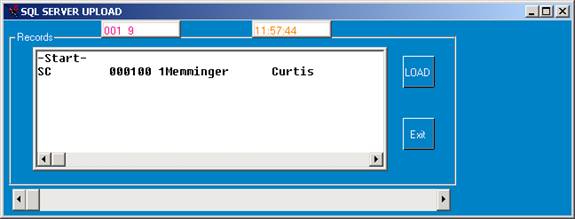
Currently interfaced patients will display in the scroll window.
Clicking the LOAD button, will cause all the encountered patients to reload into the interface file.
Clicking the EXIT button will terminate the interface program.
How to queue a selected patient into the interface:
- Pull up the patient in the Patient Information Screen.
- Enter the command 'E' at the command line.
- The patient will be sent to the interface file in about 5 seconds.
- This will Queue a non-encountered patient to be interfaced to transcription.
- All patients with encounter numbers are automatically interfaced and sent over.
- Record totals are displayed at the top right of the interface screen.
How to load patients from a past date.
- login in to Office Medicine on the server, except choose the working date needed for the interface instead of pressing return for the current date. (This will require an ADMIN or SUPER login ID.)
- The patients that were encountered ( or queued ) for this working date will be interfaced upon starting the interface.